

Kraken is my pick for the best crypto exchange in Australia for active traders, while CoinSpot is my top choice for beginners and Binance stands out for low-cost spot trading.
I tested eight crypto exchanges available to Australians, comparing trading fees, spreads, AUD deposits, withdrawals, security features and ease of use.
I opened accounts, funded them with Australian dollars, placed trades and tested withdrawals to see how each platform performed beyond its advertised fees.
One of the biggest differences was the cost of buying Bitcoin.
In my A$1,000 buy-and-sell comparison, estimated round-trip costs ranged from A$3.50 using CoinSpot market orders to A$37 using eToro’s tested route.
The trading interface you choose can make a substantial difference to what you pay.
Below, I compare all eight exchanges, explain who each is best suited for and share my hands-on findings to help you choose the right platform.
- Earn passive rewards by staking ETH, SOL, ADA, and more
- Access Web3 lending and tokenization through eToro's wallet
- Themed crypto Smart Portfolios for diversified exposure
Capital at risk. T&Cs apply.
How I tested and ranked the exchanges
I tested eight crypto exchanges using funded Australian accounts in October 2026.
I deposited AUD, bought Bitcoin and Ethereum, compared instant-buy prices with order-book trades, and tested bank and crypto withdrawals where available.
- 8 funded Australian accounts
- A$18,000 deposited across the eight exchanges
- Bitcoin and Ethereum trades placed
- Market and limit orders tested where available
- Instant-buy and advanced trading routes compared
- AUD bank withdrawals and external crypto transfers tested
- Tested on iPhone 17 (iOS 26.6) and desktop Chrome
Each exchange then received a weighted score out of 100 across seven factors:
- Cost on the cheapest available route: 30%
- Cost and clarity of the default buy route: 15%
- AUD funding and withdrawals: 15%
- Crypto ownership and wallet transfers: 15%
- Trading tools: 10%
- Asset range and currencies: 10%
- Regulatory record: 5%
Every cost figure in this guide comes from the same measured A$1,000 Bitcoin round trip, including commission, spread and any currency conversion.
That applies to the comparison table, the round-trip tables and the reviews. To be ranked at all, an exchange also had to meet three entry requirements.
The scoring rules and entry requirements are set out in full under How the ranking was calculated, below the round-trip results.
Best crypto exchanges in Australia compared
| Exchange | Best for | Trading fees or tested route | Estimated A$1,000 BTC round-trip cost | Main trade-off |
|---|---|---|---|---|
| Kraken | Active spot traders | Kraken Pro: 0.40% maker / 0.80% taker at entry tier | ~A$16.40 on Pro market orders | Instant Buy costs more and the cheaper Pro interface is less obvious |
| CoinSpot | Australian beginners | 0.1% market orders; 1% Instant Buy | ~A$3.50 using market orders | The default Buy route costs considerably more |
| eToro | Copy trading and multi-asset investing | 1% to open and 1% to close crypto positions, plus AUD/USD conversion | ~A$37 on the tested quoted route, including ~A$15 conversion | Currency conversion and crypto transfers add to costs |
| Binance | Low-cost spot trading | 0.10% maker / 0.10% taker before eligible discounts | ~A$4.50 using BTC/AUD market orders | The Pro interface is more complex, and AUD pairs can have wider spreads |
| Swyftx | Straightforward AUD funding | 0.6% entry-tier trading fee, plus spread | ~A$20 on the quoted route | The spread is built into the quote rather than itemised |
| Coinbase | Simple buying with an advanced option | Variable Simple Trade fees; Advanced Trade has maker/taker fees | ~A$13 using Advanced Trade market orders | Simple Trade cost about 2% on the tested A$250 purchase |
| CoinJar | Simple purchases and order-book trading | 1% simple conversion; 0.10% maker / taker on CoinJar Exchange AUD pairs | ~A$3.80 using CoinJar Exchange | The cheaper exchange requires a separate interface and internal transfer |
| Independent Reserve | Order-book trading with transparent pricing | 0.50% entry-tier trading fee | ~A$11.20 on market orders | Higher entry fees and a more curated coin selection |
Round-trip costs are for a A$1,000 Bitcoin buy-and-sell on the cheapest route available to an entry-tier AUD customer in October 2026.
They include commission on both legs, measured spread or slippage and any currency conversion charged. The same figures are used in the reviews and the ranking.
1. Kraken — Best overall for active crypto traders
Verdict: Kraken is the strongest pick for active spot traders who will use Kraken Pro’s order book, where the entry tier costs 0.40% maker / 0.80% taker.
The trade-off is that its Instant Buy route charges 1% plus spread.
In my test, a A$500 Instant Buy cost about A$8 including the estimated spread, against about A$4.15 in fees and slippage for the same order on Kraken Pro.
Key information
| Field | Details |
|---|---|
| Best for | Active spot traders |
| Trading routes | Instant Buy/Sell and Kraken Pro (order book) |
| Kraken Pro entry fee | 0.40% maker / 0.80% taker |
| Instant Buy/Sell fee | 1% (1.5% custom orders), plus spread and payment fees |
| AUD funding | PayID / bank transfer |
| Order types (Pro) | Market, limit, stop-loss, take-profit |
| Australian regulation | On AUSTRAC’s virtual asset service provider (VASP) register as Bit Trade Pty Limited (ABN 42 163 237 634), trading as Kraken |
What I tested: iPhone 17, iOS 26.6, Kraken app v3.14 (Instant Buy) and MacBook Air, Chrome (Kraken Pro), Intermediate-verified individual account, A$3,000 deposited by PayID, October 2026.
What was it like using Kraken?
Verification took 22 minutes with my driver’s licence and a selfie. I then deposited A$3,000 by PayID, and it was ready to trade nine minutes later.
I started where most beginners would, with a A$500 Bitcoin purchase through Instant Buy in the main app.
The confirmation screen showed a A$5.00 fee (1% of A$500). It didn’t show the spread.
Checking the quote against the market mid-price, I paid roughly another A$3.00, so the purchase really cost about 1.6%.
Next I made the same A$500 BTC purchase on Kraken Pro in Chrome as a market order.
The fee was A$4.00 at the 0.80% taker rate, and slippage added about 15 cents, roughly half the Instant Buy cost. I then placed a A$500 ETH limit order just under the best bid.
It filled 11 minutes later at the 0.40% maker rate, which cost me A$2.00.
A full A$1,000 BTC buy-and-sell on Pro market orders came to about A$16.40, against more than A$30 through Instant Buy.
For anyone trading regularly, that maker/taker split is the reason to choose Kraken.
The friction is that nothing in the Instant Buy flow tells you Pro exists.
You have to know to switch interfaces or download the separate Pro app, and I suspect most beginners never do. At the end I withdrew 0.002 BTC to my hardware wallet.
Whitelisting the address added a step, and the coins arrived 34 minutes later. My A$500 bank withdrawal landed the next business morning.
How much does Kraken charge in Australia?
Kraken Pro charges 0.40% maker and 0.80% taker at the entry tier, while Instant Buy/Sell charges 1% (1.5% for custom orders) plus spread.
In my A$1,000 BTC round trip on Pro using market orders, the combined cost came to about A$16.40. The same trade through Instant Buy would have cost more than A$30.
Never quote the two fee schedules as if they apply to the same trade.
Who is Kraken best for?
Kraken is best for Australians who place regular spot trades and are comfortable using an order book. Patient traders who use limit orders get the 0.40% maker rate.
It’s a weaker fit for one-tap buyers, because Instant Buy is one of the more expensive simple-purchase routes in this comparison.
Pros & cons
- Kraken Pro order book with 0.40% maker / 0.80% taker fees at entry tier
- Maker and taker fees clearly labelled before you confirm
- Address whitelisting and 2FA on crypto withdrawals
- Instant Buy costs 1% plus spread, about 1.6% in my test
- The cheaper Pro route isn't signposted to beginners
Read the complete Kraken review here.
2. CoinSpot — Best for Australian beginners

Verdict: CoinSpot was the simplest PayID-to-purchase experience in my testing: the deposit was credited in three minutes and the first purchase took three taps.
Its market orders cost just 0.1%. The trade-off is that the big green Buy button routes you to Instant Buy at 1%, ten times the market-order rate.
Key information
| Field | Details |
|---|---|
| Best for | Beginners wanting a locally focused platform |
| Market and OTC orders | 0.1% |
| Instant Buy/Sell/Swap | 1% |
| Recurring buys / stop and limit orders | 1% |
| AUD deposits | PayID and direct deposit free; card 1.22%; PayPal 0.5%; cash 2.5% |
| AUD bank withdrawals | Free |
| Tax reporting | Built-in transaction export |
| Australian regulation | On AUSTRAC’s VASP register as Casey Block Services Pty Ltd (ABN 19 619 574 186), trading as CoinSpot |
What I tested: iPhone 17, iOS 26.6, CoinSpot app v4.8 plus desktop site in Chrome, fully verified individual account, A$2,000 deposited by PayID, October 2026.
What was it like using CoinSpot?
Verification took 14 minutes. I then sent A$2,000 by PayID from my banking app, and it showed in my CoinSpot wallet three minutes later with no fee.
I searched “bitcoin”, tapped Buy and entered A$300. The order went through in three taps.
The confirmation showed the A$3.00 fee (1% of A$300), but the instant rate cost me roughly another 90 cents against the mid-price.
That big green Buy button is the expensive route, and the app doesn’t suggest an alternative.
Next I opened the Markets tab on the desktop site and placed a A$300 ETH/AUD market order.
The fee dropped to 30 cents (0.1%), and the only other cost was a small order-book spread. I then ran a A$1,000 BTC buy-and-sell on market orders, which cost about A$3.50 in total.
The same round trip through Instant Buy and Instant Sell would have been around A$26. That gap is the single most useful thing a CoinSpot beginner can learn.
The friction is finding it. On mobile, market orders sit behind the Markets menu rather than on the coin page. I also set up a A$50 weekly recurring buy.
It took under a minute, but it’s charged at the 1% instant rate, not 0.1%. At the end I withdrew A$400 to my bank for free, and it arrived just over two hours later.
How much does CoinSpot charge?
CoinSpot charges 0.1% on market and OTC orders and 1% on Instant Buy, Sell, Swap, recurring buys and stop/limit orders.
PayID and direct AUD deposits are free, and bank withdrawals are free. Card deposits cost 1.22%, PayPal 0.5% and cash 2.5%.
Who is CoinSpot best for?
CoinSpot is best for Australian beginners who want simple AUD funding and a clean app. Those who learn to use the Markets tab cut their trading fee from 1% to 0.1%.
For recurring buyers it’s less compelling, because automated purchases are charged at the 1% instant rate.
Pros & cons
- Free PayID deposits, credited in three minutes
- 0.1% fee on market orders
- Free AUD bank withdrawals
- Built-in tax report exports
- The default Buy button uses the 1% Instant route
- Recurring buys are charged at 1%, not the 0.1% market-order rate
- Market orders are hidden behind the Markets menu on mobile
Read the complete CoinSpot review here.
3. eToro — Best for copy trading and multi-asset investing

Verdict: eToro is the best choice here if you want to copy other investors’ crypto portfolios on one of the most popular copy trading platforms.
It also lets you hold crypto alongside shares and ETFs in one account. The trade-off is cost.
A 1% fee to open and a 1% fee to close, plus currency conversion, make it one of the more expensive ways to simply buy and sell Bitcoin.
Key information
| Field | Details |
|---|---|
| Best for | Copy trading and multi-asset investors |
| Crypto opening / closing fee | 1% / 1% |
| Market spread | Additional; varies with conditions |
| Transfer to eToro Money wallet | 2% (subject to published caps) |
| AUD account | Listed for eligible Australian users |
| Currency conversion | Charged when AUD funds buy USD-priced assets: A$7.50 per leg on my A$1,000 trade (0.75%). eToro has published this rate as a discount, so check the conversion line on your own ticket |
| Copy trading minimum | US$200 per copied investor (about A$310) |
| Order book | No; quoted dealing price |
| Australian regulation | On AUSTRAC’s VASP register as eToro AUS Capital Limited (ABN 66 612 791 803), which also holds AFSL 491139. The AFSL covers its licensed financial products; it doesn’t make non-leveraged crypto positions regulated financial products |
What I tested: iPhone 17, iOS 26.6, eToro app v612 plus web platform in Chrome, Australian retail account with an AUD balance, A$1,500 deposited by bank transfer, October 2026.
What was it like using eToro?
Verification took 12 minutes, close to the 10 minutes in my earlier UK test.
I then deposited A$1,500 into the AUD balance by bank transfer, and it was available four hours and twenty minutes later. That’s slower than the PayID-led local exchanges.
I searched BTC, opened the trade ticket and checked that it was a real crypto purchase at x1 rather than trading a leveraged CFD.
Then I bought A$1,000 of Bitcoin, six clicks from login, the same as my earlier UK test.
Before I confirmed, the ticket showed a A$10 fee (1% of A$1,000) and a separate AUD-to-USD conversion line of about A$7.50, because Bitcoin is priced in dollars.
I’d rather see that upfront than discover it in my statement. Against the mid-price, the execution added roughly another A$2.
When I closed the position, the 1% closing fee and a second conversion took the round trip to about A$37.
Next I tried what eToro actually does best.
I filtered Popular Investors by crypto exposure, checked one investor’s 12-month drawdown and risk score, and allocated A$310, roughly the US$200 minimum.
Setup took four minutes, and I set a copy stop-loss before confirming.
Their existing positions were copied proportionally straight away, which is what you want if you’re handing over the decisions.
The friction is self-custody.
Before closing the position, I checked what it would cost to move the Bitcoin to the eToro Money wallet: 2%, or about A$20 on my A$1,000 holding, so taking coins off the platform is expensive here.
At the end I withdrew A$500, and it reached my bank two business days later.
How much does eToro charge for crypto in Australia?
eToro charges 1% to open and 1% to close a crypto position, plus the market spread and currency conversion on USD-priced assets.
Transferring crypto to the eToro Money wallet costs a further 2%. In my A$1,000 BTC round-trip test, the estimated combined cost was about A$37 (3.7%).
That was A$20 in opening and closing fees, about A$15 in AUD/USD conversion across both legs and about A$2 in price difference against the market mid-price.
The conversion figure is what eToro charged on my October 2026 trades, not an assumed published rate.
Who is eToro best for?
eToro is best for Australians who want to copy experienced crypto investors and keep crypto, shares and ETFs in one portfolio. It is not the cheapest way to buy and hold Bitcoin.
The 1% fee each way and the conversion costs make frequent trading expensive.
Pros & cons
- CopyTrader with detailed investor risk scores and drawdown history
- Crypto, shares and ETFs in one account
- Fees and currency conversion itemised on the trade ticket
- 1% to open and 1% to close, plus currency conversion
- 2% fee to move crypto to the eToro Money wallet
- No order book; you trade at a quoted dealing price
Read the complete eToro review here.
4. Binance — Best for low-cost spot trading
Verdict: Binance shares the lowest headline spot fee in this comparison, 0.10% maker / 0.10% taker, and is the only platform here where you can cut it further by paying in BNB.
The trade-off is that AUD pairs carry thinner order books than USDT pairs, and Australian funding options and product availability are narrower than the global site suggests.
Key information
| Field | Details |
|---|---|
| Best for | Cost-conscious spot traders |
| Standard spot fee | 0.10% maker / 0.10% taker |
| BNB discount | Available on eligible fees |
| Trading tools | Spot order book; Lite and Pro app modes |
| AUD funding | AUD bank transfer |
| Product restrictions | Australian product set differs from the global site |
| Australian regulation | On AUSTRAC’s VASP register as Investbybit Pty Ltd (ABN 98 621 652 579), trading as Binance Australia. AUSTRAC directed it to appoint an external auditor over AML/CTF concerns in August 2025, and AUSTRAC’s register of external-auditor notices lists a Binance Australia notice under 2026 |
What I tested: iPhone 17, iOS 26.6, Binance app v2.98 (Pro mode) plus desktop in Chrome, Australian individual account, A$2,500 deposited by AUD bank transfer, October 2026.
What was it like using Binance?
Onboarding took longer than at the local exchanges. Verification ran to 31 minutes, including a source-of-funds question nobody else asked.
I deposited A$2,500 through the AUD bank-transfer option offered at signup, and it was credited after 47 minutes.
I switched the app to Pro mode, opened BTC/AUD and placed a A$600 market order.
Before I confirmed, the ticket showed a 60-cent fee (0.10% of A$600), the joint-lowest commission rate in this test, level with CoinSpot’s market orders and CoinJar Exchange.
However, the AUD order book was noticeably thinner than BTC/USDT, and spread and slippage added around 90 cents on top.
Next I bought A$20 of BNB, turned on “Use BNB to pay for fees” and placed a A$400 ETH/AUD limit order. That cut the fee to about 30 cents.
The catch is that you need a small BNB balance you might not otherwise want.
My A$1,000 BTC buy-and-sell came to about A$4.50 all-in, still one of the lowest results here, but higher than the 0.10% headline suggests.
The friction is the interface. Pro mode is dense, and the AUD pairs are buried among hundreds of USDT markets, so I relied on the search bar every time.
At the end I withdrew BTC to my hardware wallet. The network fee was shown before I confirmed, 2FA and an email approval added a minute, and the coins arrived 41 minutes later.
How much does Binance charge in Australia?
Binance charges a standard 0.10% maker and 0.10% taker fee on spot trades, reduced further when fees are paid in BNB. Spread on AUD pairs is a separate cost.
In my A$1,000 BTC round trip it took the effective cost to about 0.45%.
Who is Binance best for?
Binance is best for cost-focused Australians who trade spot crypto regularly and are comfortable with a dense Pro interface.
Beginners who want a simple local experience, or anyone who needs a wide range of AUD payment methods, will find CoinSpot or Swyftx easier.
Pros & cons
- 0.10% maker / 0.10% taker spot fees
- Lowest commission tested once the BNB discount is applied
- Deep trading tools and a wide asset range
- Thinner AUD order books widen the real cost
- Longest onboarding in this test at 31 minutes
- Australian product set differs from the global site
Read the complete Binance review here.
5. Swyftx — Best for straightforward AUD funding

Verdict: Swyftx makes AUD funding and regular buying very easy, with free PayID and bank deposits, free AUD withdrawals and a quote-based buy screen.
The trade-off is that new customers pay the 0.6% entry-tier fee, not the headline “from 0.1%”, plus a variable spread built into each quote.
Key information
| Field | Details |
|---|---|
| Best for | Beginners and regular AUD-funded buyers |
| Standard trading fee | 0.6% at the entry tier |
| Volume discounts | Fee falls with eligible 30-day trading volume |
| Spread | Variable; included in quoted prices |
| AUD deposits | Bank transfer and PayID free; card processor fees may apply |
| AUD withdrawals | Free |
| Practice tools | Demo mode |
| Australian regulation | On AUSTRAC’s VASP register as Swyftx Pty Ltd (ABN 72 623 556 730). Swyftx was granted an AFSL in July 2026 covering retail derivatives, basic deposit products and non-cash payment facilities; it doesn’t cover spot crypto trading |
What I tested: iPhone 17, iOS 26.6, Swyftx app v5.21 plus desktop in Chrome, individual account on the entry fee tier, A$2,000 deposited by PayID, October 2026.
What was it like using Swyftx?
Before putting money in, I spent ten minutes in demo mode learning the order screen. Like the top demo trading accounts, it’s a genuinely useful way to make your first mistakes for free.
Verification took 11 minutes.
Then I deposited A$2,000 by PayID, and it was available two minutes later, the fastest funding in this test.
I bought A$400 of Bitcoin in five taps from the home screen. Before I confirmed, the quote showed a A$2.40 fee (0.6% of A$400) as a separate line.
What it didn’t show was the spread. Against the market mid-price, I paid roughly another A$1.60, so the real cost was about 1%.
Next I added a A$150 ETH purchase, then ran a A$1,000 BTC buy-and-sell, which came to around A$20. A$12 of that was the 0.6% entry fee each way, and the rest was spread.
That’s the rate a new customer actually pays, not the “from 0.1%” on the homepage.
I then set up a A$25 weekly recurring buy in under a minute, the kind of set-and-forget habit Swyftx makes easy.
The friction is cost transparency. Because the spread isn’t itemised, you can only see it by checking a reference price yourself.
At the end I withdrew ETH to my own wallet, with the network fee shown upfront, and it arrived in nine minutes.
My A$300 AUD withdrawal was free and reached my bank the same afternoon.
How much does Swyftx charge?
Swyftx charges a 0.6% trading fee at the standard entry tier, falling with 30-day volume, plus a variable spread included in the quoted price.
AUD bank transfer and PayID deposits are free, as are AUD withdrawals. The marketing headline of fees “from 0.1%” applies only at higher volume tiers.
Who is Swyftx best for?
Swyftx is best for Australians who want effortless PayID funding, a demo mode to practise in and simple recurring buys. Cost-focused traders will pay less on an order book.
My Swyftx round trip cost nearly six times more than CoinSpot’s market orders (A$20 versus A$3.50).
Pros & cons
- Free PayID deposits, credited in two minutes
- Free AUD withdrawals, same-day in my test
- Demo mode for practising before you fund
- Five taps from home screen to filled order
- New users pay the 0.6% entry fee, not the headline "from 0.1%"
- Spread isn't itemised on quotes
Read the complete Swyftx review here.
6. Coinbase — Best for a simple interface with an advanced option
Verdict: In my testing, Coinbase had the cleanest simple-buy flow, four taps to a preview, plus an Advanced Trade order book in the same account.
The trade-off is that Simple Trade was the most expensive route I tested, at around 2% for a single purchase, and the fee is only revealed on the preview screen.
Key information
| Field | Details |
|---|---|
| Best for | Users who want a simple interface plus an advanced trading option |
| Simple Trade fees | Variable by order size, payment method and market; shown in the preview |
| Simple Trade spread | Included in the quoted price |
| Advanced Trade | Order book; maker/taker fee by 30-day volume tier |
| AUD funding | PayID deposits; AUD bank withdrawals |
| Self-custody | Separate Coinbase Wallet app |
| Australian regulation | On AUSTRAC’s VASP register as Coinbase Australia Pty Ltd (ABN 89 654 922 442) |
What I tested: iPhone 17, iOS 26.6, Coinbase app v13.4 plus Advanced Trade in Chrome, Australian individual account, A$2,000 deposited by PayID, October 2026.
What was it like using Coinbase?
Verification took 18 minutes. I then deposited A$2,000 by PayID, and it was ready six minutes later. I bought A$250 of Ethereum through the standard app first.
It’s the cleanest flow of the eight: four taps, then a preview screen.
That preview was the first time I saw what the trade would cost.
Including the spread against the mid-price, the purchase came to about A$5.00 (2%): a A$3.75 fee plus roughly A$1.25 of spread. That was the most expensive single buy in this test.
I’d prefer to see the fee before I get to the final screen, not on it.
Next I logged into Advanced Trade on desktop with the same account and placed a A$250 BTC market order.
At the entry-tier taker rate, the fee was about A$1.50, less than a third of the Simple Trade cost. My A$1,000 BTC buy-and-sell on Advanced came to about A$13 all-in.
Being able to move to an order book without opening a new account is Coinbase’s real advantage.
The friction is that the mobile app keeps steering you back to Simple Trade.
Getting to Advanced takes a deliberate tap into a separate view, so price-conscious buyers need to know it’s there. At the end I withdrew BTC to my hardware wallet.
There was a 2FA prompt and a clear fee preview, and the coins arrived 28 minutes later.
How much does Coinbase charge in Australia?
Coinbase’s Simple Trade fees vary by order size, payment method and market conditions, and the spread is included in the quoted price.
The exact cost appears only in the order preview. Advanced Trade uses maker/taker fees set by 30-day volume.
In my tests, a A$250 order cost about A$1.50 on Advanced against A$5.00 on Simple Trade, less than a third as much.
Who is Coinbase best for?
Coinbase is best for first-time buyers who value a polished app and want the option to move to an order book later without opening a new account.
Price-sensitive users should go straight to Advanced Trade. Simple Trade was the most expensive purchase route in my testing.
Pros & cons
- Cleanest simple-buy flow in this test
- Advanced Trade order book in the same login
- Clear fee previews on crypto withdrawals
- Simple Trade cost about 2% on a single purchase
- The fee only appears on the final preview screen
- The app steers you away from the cheaper Advanced Trade
Read the complete Coinbase review here.
7. CoinJar — Best for choosing between simple purchases and a dedicated exchange
Verdict: CoinJar suits buyers who want a simple 1% conversion today and a 0.10% exchange order book once they’re confident. Both run under the same provider.
The trade-off is that moving between the two takes an internal transfer and a separate interface, and card purchases cost 2%.
Key information
| Field | Details |
|---|---|
| Best for | Users who want simple purchases plus an exchange option |
| Fiat-to-crypto / crypto-to-fiat conversion | 1% |
| Card purchases | 2% |
| CoinJar Exchange AUD pairs (entry tier) | 0.10% maker / 0.10% taker, including GST |
| AUD funding | PayID and bank transfer |
| Recurring buys | Available in the main app |
| Australian regulation | On AUSTRAC’s VASP register as CoinJar Australia Pty Ltd (ABN 75 648 570 807) |
What I tested: iPhone 17, iOS 26.6, CoinJar app v3.37 plus CoinJar Exchange in Chrome, verified individual account, A$2,000 deposited by PayID plus a A$50 card purchase, October 2026.
What was it like using CoinJar?
Verification took 16 minutes. I then deposited A$2,000 by PayID, and it was credited four minutes later. In the main app I bought A$300 of Bitcoin.
The confirmation showed a A$3.00 conversion fee (1% of A$300), and the rate added roughly 80 cents more.
I also tried a A$50 ETH card purchase, the route someone in a hurry might take. It cost A$1.00 at the 2% card rate. That’s fine for an occasional top-up, but expensive as a habit.
Next I opened CoinJar Exchange in Chrome, which is where CoinJar gets interesting for cost-conscious buyers.
I placed a A$300 ETH/AUD limit order, and it filled at the 0.10% maker rate for 30 cents.
My A$1,000 BTC buy-and-sell on the Exchange cost about A$3.80, close to CoinSpot’s market-order result.
I liked that the 0.10% includes GST, so the number on the screen is the number you pay.
The friction came before that first Exchange order. I had to move AUD from my main account into the Exchange wallet.
The transfer itself was instant, but it took five extra steps and isn’t signposted in the app.
At the end I withdrew BTC to an external wallet, with the network fee shown upfront, and A$350 to my bank, which arrived in under two hours.
How much does CoinJar charge?
CoinJar charges 1% on simple fiat-to-crypto and crypto-to-fiat conversions and 2% on card purchases.
CoinJar Exchange charges 0.10% maker and 0.10% taker on AUD pairs at the entry tier, including GST.
Treat the two products separately: on a A$300 purchase, the fee was A$3.00 in the simple app and 30 cents on the Exchange, a tenfold difference.
Who is CoinJar best for?
CoinJar is best for Australians who start with simple buys but want an order book from the same provider once they’re comfortable.
It’s less convenient than CoinSpot for beginners, because the low-cost route sits in a separate interface that requires an internal transfer.
Pros & cons
- 0.10% Exchange fee on AUD pairs, including GST
- PayID deposit credited in four minutes
- Simple and advanced trading routes from one provider
- 1% fee on simple conversions and 2% on card purchases
- Reaching the cheaper Exchange takes an internal transfer and five extra steps
8. Independent Reserve — Best for an Australian-focused exchange with order-book pricing

Verdict: Independent Reserve showed its trading fee as a separate line on the order screen, and I found no added platform spread in my test.
The trade-off is a 0.50% entry fee that is higher than CoinSpot, CoinJar Exchange or Binance, and a smaller coin list than the big retail apps.
Key information
| Field | Details |
|---|---|
| Best for | Users who prioritise order-book trading and transparent pricing |
| Entry trading fee | 0.50% |
| Volume discounts | Falls to 0.02% at the A$200 million 30-day volume tier |
| Spread | No additional platform spread on the order book |
| Fiat currencies | AUD, NZD, USD, SGD |
| Bank withdrawals | Free EFT withdrawals |
| Asset range | Curated; smaller than broad retail exchanges |
| Australian regulation | On AUSTRAC’s VASP register as Independent Reserve Pty Ltd (ABN 46 164 257 069) |
What I tested: MacBook Air, Chrome (web platform) and iPhone 17, iOS 26.6, Independent Reserve app v2.6, personal account on the entry fee tier, A$3,000 deposited by PayID/Osko, October 2026.
What was it like using Independent Reserve?
Verification took 26 minutes. I then deposited A$3,000 by PayID/Osko, the largest deposit in this comparison, and it cleared seven minutes later.
The first thing I did was place a A$1,000 BTC/AUD market order on the web platform.
Before I confirmed, the order screen showed a A$5.00 fee (0.50% of A$1,000).
The fill matched the top of the order book to within a few dollars of the mid-price, which backs up the no-added-spread claim.
Knowing the fee is the whole cost is rare in this test, and I valued it.
Next I placed a A$500 ETH limit order, which filled six minutes later. Unlike Kraken, there’s no cheaper maker rate at the entry tier, so I paid the same 0.50% (A$2.50).
Selling the BTC back completed a round trip of about A$11.20.
That’s cheaper than Swyftx, Coinbase Simple or Kraken Pro market orders, but dearer than CoinSpot’s market orders or CoinJar Exchange.
The friction is choice. The coin list is curated, so anyone hunting small-cap altcoins will hit a wall quickly.
I also emailed support about daily withdrawal limits, and a specific answer came back in just over three hours.
At the end my ETH withdrawal arrived in 12 minutes, and A$1,000 by EFT landed free the next business day.
How much does Independent Reserve charge?
Independent Reserve charges a 0.50% trading fee at the entry tier, falling with 30-day AUD volume to 0.02% at the A$200 million tier.
It says there is no additional spread on its order book. EFT bank withdrawals are free.
Who is Independent Reserve best for?
Independent Reserve is best for Australians who want clean order-book pricing with no hidden spread.
It especially suits larger or higher-volume traders who can climb the fee tiers.
Beginners chasing the lowest small-trade cost, or anyone wanting a long list of altcoins, will do better elsewhere.
Pros & cons
- No added spread; fills matched the order book
- Free EFT withdrawals
- AUD, NZD, USD and SGD supported
- Specific email support reply in just over three hours
- 0.50% entry fee with no cheaper maker rate
- Smaller, curated coin list
Round-trip results
Each figure is a A$1,000 Bitcoin buy followed by an immediate sale, at the entry fee tier, in October 2026. Fees are the commissions charged on both legs.
Spread and slippage were measured against the market mid-price at execution, and eToro’s figure also includes the AUD/USD conversion it charged on both legs.
These are the same figures used in the comparison table, the reviews and the ranking.
Lowest-cost route: order books and advanced interfaces
| Platform | Route and order type | Fees (buy + sell) | Est. spread / slippage | Round-trip total |
|---|---|---|---|---|
| CoinSpot | Markets tab, market orders | A$2.00 (0.1% each way) | ~A$1.50 | ~A$3.50 (0.35%) |
| CoinJar Exchange | BTC/AUD market orders | A$2.00 (0.10% each way) | ~A$1.80 | ~A$3.80 (0.38%) |
| Binance | BTC/AUD market orders, Pro mode | A$2.00 (0.10% each way) | ~A$2.50 | ~A$4.50 (0.45%) |
| Independent Reserve | Market orders | A$10.00 (0.50% each way) | ~A$1.20 | ~A$11.20 (1.12%) |
| Coinbase Advanced | Market orders (taker) | A$12.00 (0.60% each way) | ~A$1.00 | ~A$13.00 (1.3%) |
| Kraken Pro | Market orders (taker) | A$16.00 (0.80% each way) | ~A$0.40 | ~A$16.40 (1.64%) |
Simple-buy route: instant purchases and quoted prices
| Platform | Route | Fees (buy + sell) | Est. spread / other | Round-trip total |
|---|---|---|---|---|
| Swyftx | Quoted buy and sell (only route) | A$12.00 (0.6% each way) | ~A$8.00 spread | ~A$20.00 (2.0%) |
| CoinSpot | Instant Buy / Instant Sell | A$20.00 (1% each way) | ~A$6.00 spread | ~A$26.00 (2.6%) |
| Kraken | Instant Buy / Instant Sell | A$20.00 (1% each way) | ~A$12.00 spread | ~A$32.00 (3.2%) |
| eToro | Quoted dealing price | A$20.00 (1% open + 1% close) | ~A$15.00 conversion + ~A$2.00 spread | ~A$37.00 (3.7%) |
Coinbase Simple Trade and CoinJar’s simple app weren’t round-trip tested. My single A$250 Coinbase Simple Trade buy cost about 2%, and my A$300 CoinJar simple buy cost about 1.27%.
How the ranking was calculated
Every exchange here also goes through Psyfi Money’s broader platform review process.
This guide applies its own weighting, built for Australians buying and selling crypto with AUD, and any existing Psyfi Money review rating stays separate from the order on this page.
Entry requirements
An exchange had to meet all three of these to be ranked. They are pass/fail checks, not scoring advantages.
- Australian legal entity: the business serving Australian customers is identified by its legal name and ABN or ACN.
- AUSTRAC registration: that entity appears on AUSTRAC’s Virtual Asset Service Provider Register. Since 31 March 2026, businesses that exchange crypto for money or other crypto, or hold it for customers, must be registered before providing those services in Australia. Registration is an anti-money-laundering requirement; it isn’t an endorsement and doesn’t protect customer funds.
- AUD funding: verified Australian customers could deposit and withdraw AUD by bank transfer or PayID when I tested in October 2026.
An Australian financial services licence (AFSL) was not accepted in place of AUSTRAC registration.
An AFSL authorises specific financial services, and the licences held by eToro and Swyftx don’t cover ordinary spot crypto trading.
Where a provider holds one, I report what it covers; you can check any licence on ASIC’s professional registers.
The Corporations Amendment (Digital Assets Framework) Act 2026 will require platforms that hold crypto for customers to be licensed.
It commences on 8 April 2027, with a six-month transition for platforms that have applied.
Once that requirement applies, an AFSL covering the platform will become a further entry requirement.
I checked each provider’s registration on 20 October 2026. The legal entity and ABN for each exchange are in its Key information table.
Ranking factors
| Ranking factor | Weight | What I assessed |
|---|---|---|
| Cost on the cheapest available route | 30% | Measured cost of a A$1,000 BTC buy-and-sell on the lowest-cost route available to an entry-tier AUD customer: commission on both legs, plus spread or slippage and any currency conversion (see Round-trip results) |
| Cost and clarity of the default buy route | 15% | Measured cost of the route each app presents first (instant buy or quoted price), whether the fee and spread are shown before you confirm, and whether the cheaper route is easy to find |
| AUD funding and withdrawals | 15% | PayID and bank-transfer deposit fees, card and PayPal charges (CoinSpot: 1.22% card, 0.5% PayPal) and AUD withdrawal fees |
| Ownership and wallet transfers | 15% | Whether you own the underlying crypto, can withdraw it to your own wallet, and what that costs (eToro charges 2% to move crypto to its wallet) |
| Order types and trading tools | 10% | Order book access, limit and stop orders, recurring buys and separate pro interfaces |
| Asset range and currencies | 10% | Coin selection, AUD trading pairs and supported fiat currencies (Independent Reserve: AUD, NZD, USD and SGD) |
| Regulatory record | 5% | Enforcement history beyond basic registration, such as the 2024 Federal Court penalty against Kraken’s Bit Trade and AUSTRAC’s external-auditor directions to Binance Australia |
How scores were combined
Each factor was scored out of 10, multiplied by its weight and added together, giving a total out of 100. The exchanges are numbered in order of that total.
The two cost factors are scored from measured results, not published fee schedules.
For the cheapest-route factor, I converted each exchange’s round-trip cost into a percentage of the A$1,000 trade and applied these bands:
| Round-trip cost (% of A$1,000) | Score out of 10 |
|---|---|
| 0.50% or less | 10 |
| 0.51% to 1.00% | 8 |
| 1.01% to 1.50% | 7 |
| 1.51% to 2.00% | 6 |
| 2.01% to 3.00% | 4 |
| More than 3.00% | 2 |
On that scale, CoinSpot (0.35%), CoinJar Exchange (0.38%) and Binance (0.45%) score 10.
Independent Reserve (1.12%) and Coinbase Advanced (1.3%) score 7, Kraken Pro (1.64%) and Swyftx (2.0%) score 6, and eToro (3.7%) scores 2.
Kraken Pro is scored on taker orders, like every other order-book route.
Its cheaper 0.40% maker rate, about A$8 in fees for the same round trip, is reported in the review but not used in the score, because limit orders don’t always fill.
I put 45% of the weighting on cost because the same exchange can cost ten times more depending on which buy button you press, and most readers trade more than once.
Regulatory record carries only 5% because registration is already an entry requirement; it scores enforcement history beyond that baseline.
This weighting sets the order in this guide only; each platform’s broader Psyfi Money rating stays separate.
How to buy crypto using an Australian crypto exchange?
1. Log in to the platform
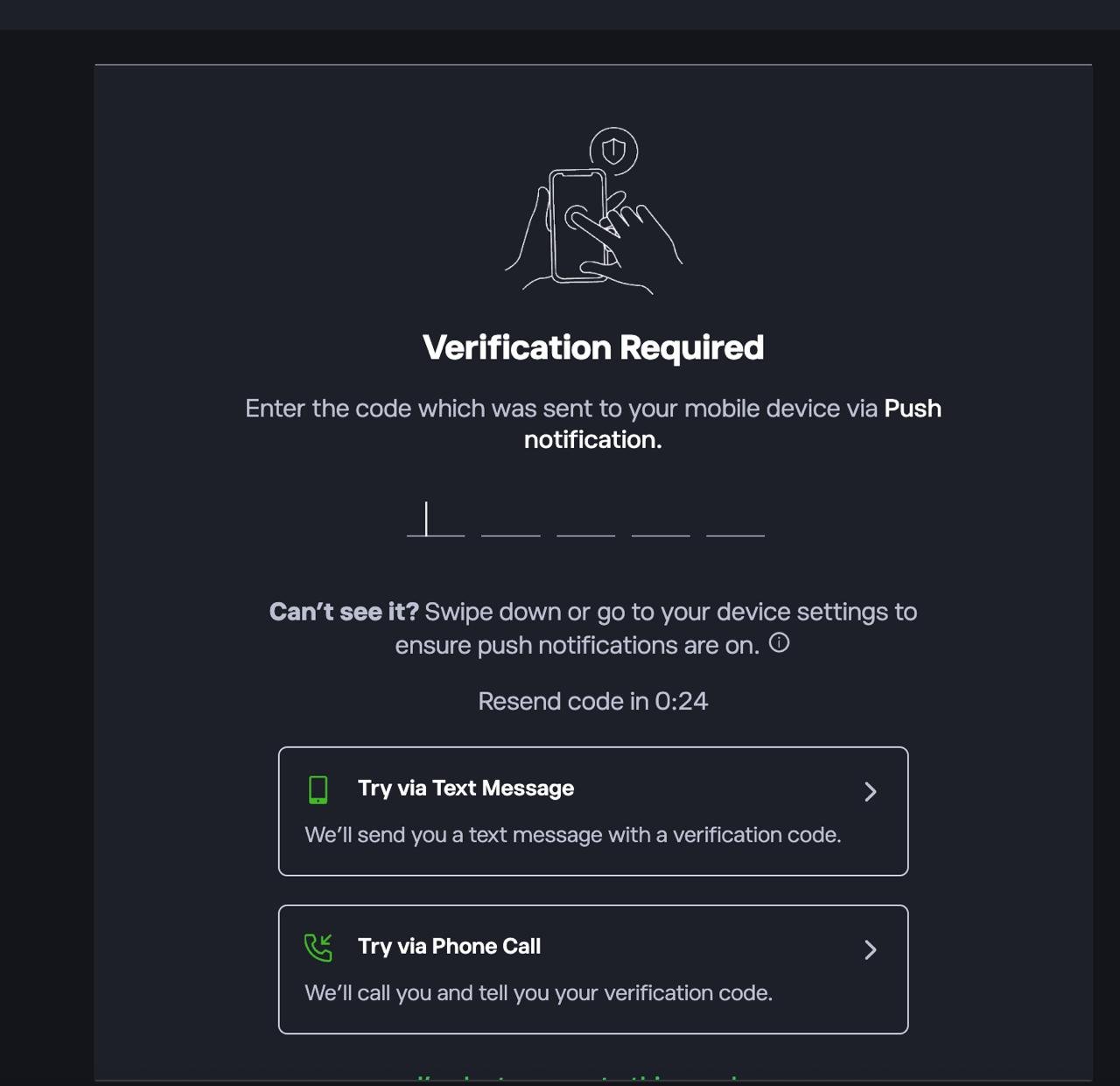
First sign up or log in to the platform. If prompted, complete 2FA by entering the code sent via push notification, SMS, or phone call.
2. Deposit funds into your account
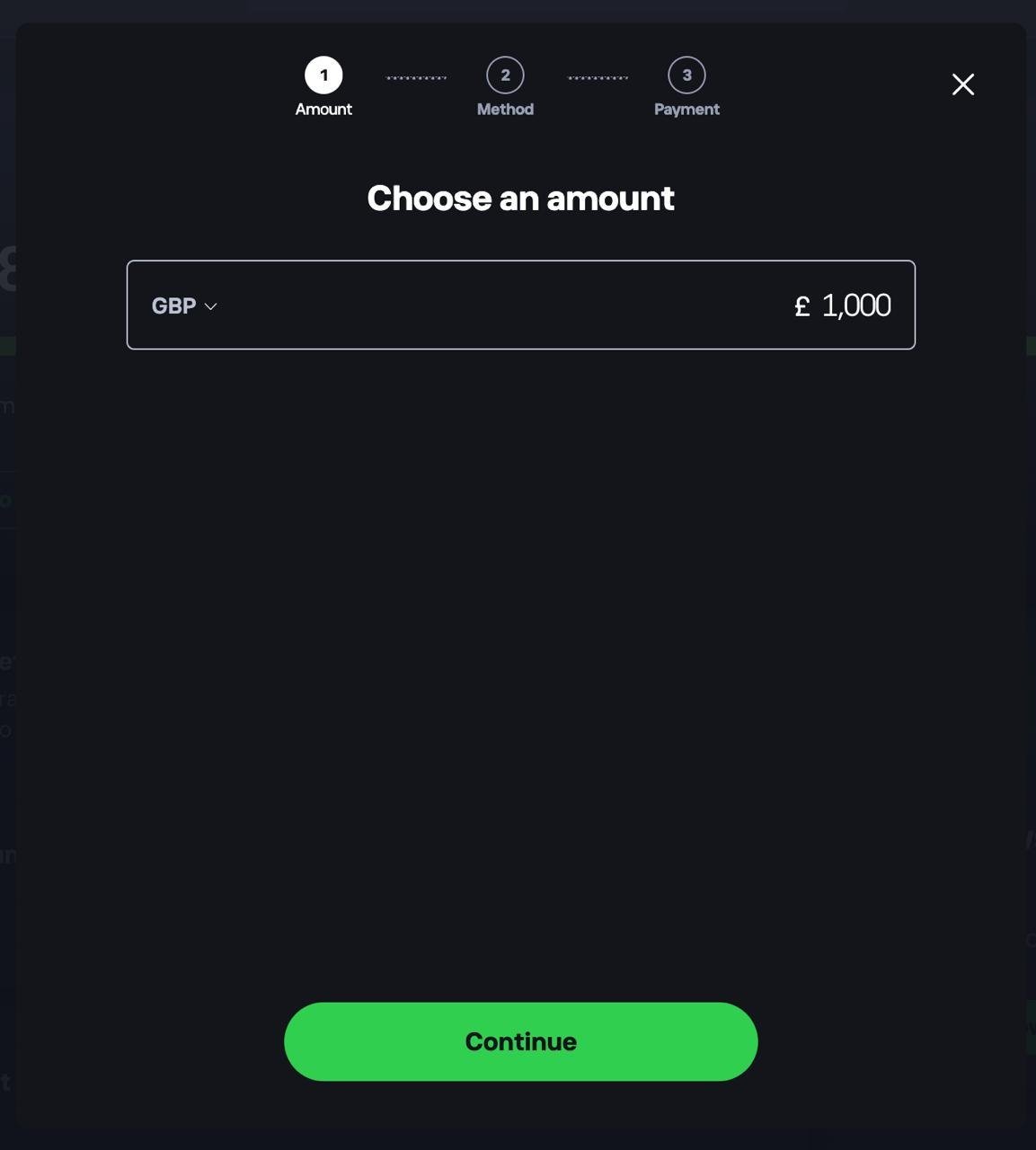
Head to your dashboard and choose to add funds. Select your currency, enter the amount you want to deposit, tap Continue, then choose a payment method.
3. Confirm your funds are available
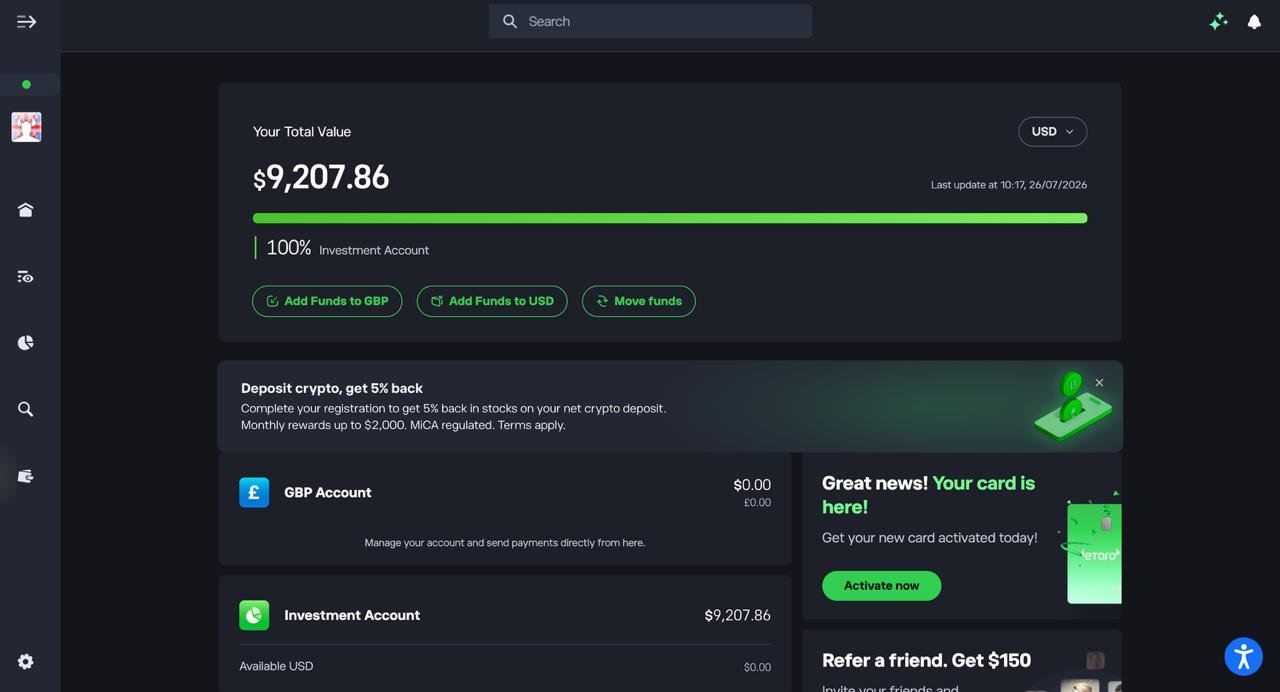
Check your dashboard to make sure your deposit has landed in your Investment Account before you start buying crypto.
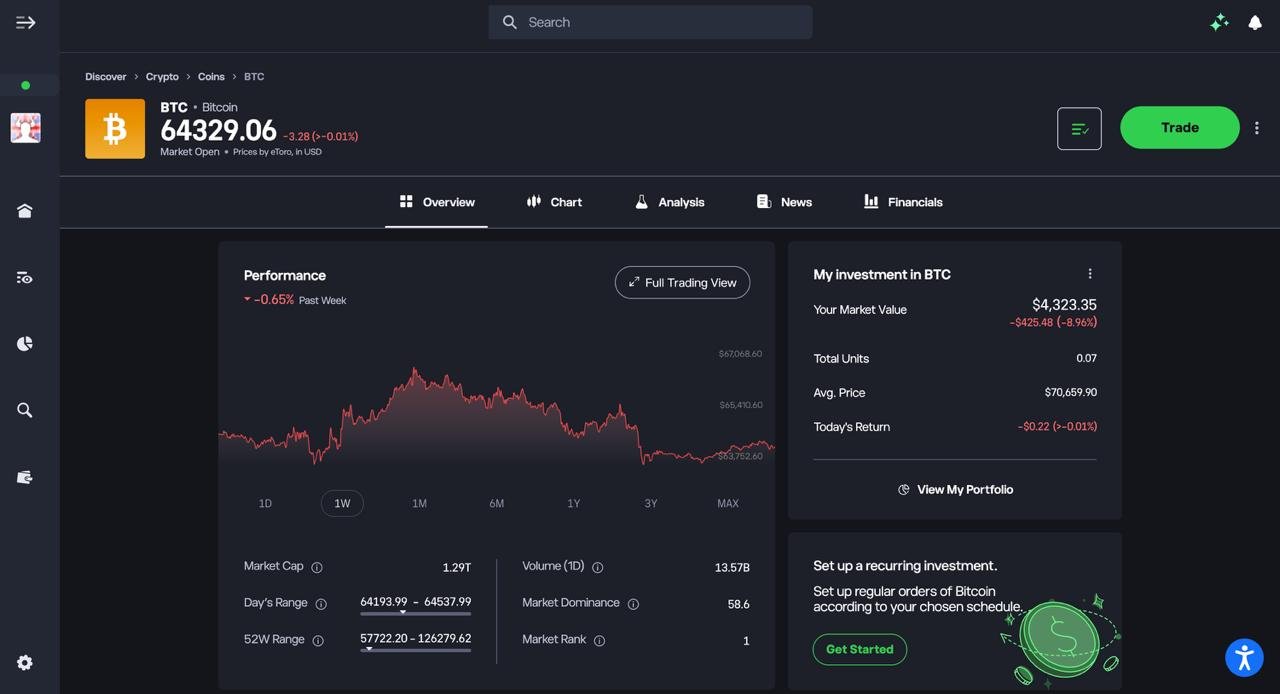
4. Find the crypto you want to buy
Search for the coin you’re after, such as Bitcoin, and open its overview page to check the current price and performance.
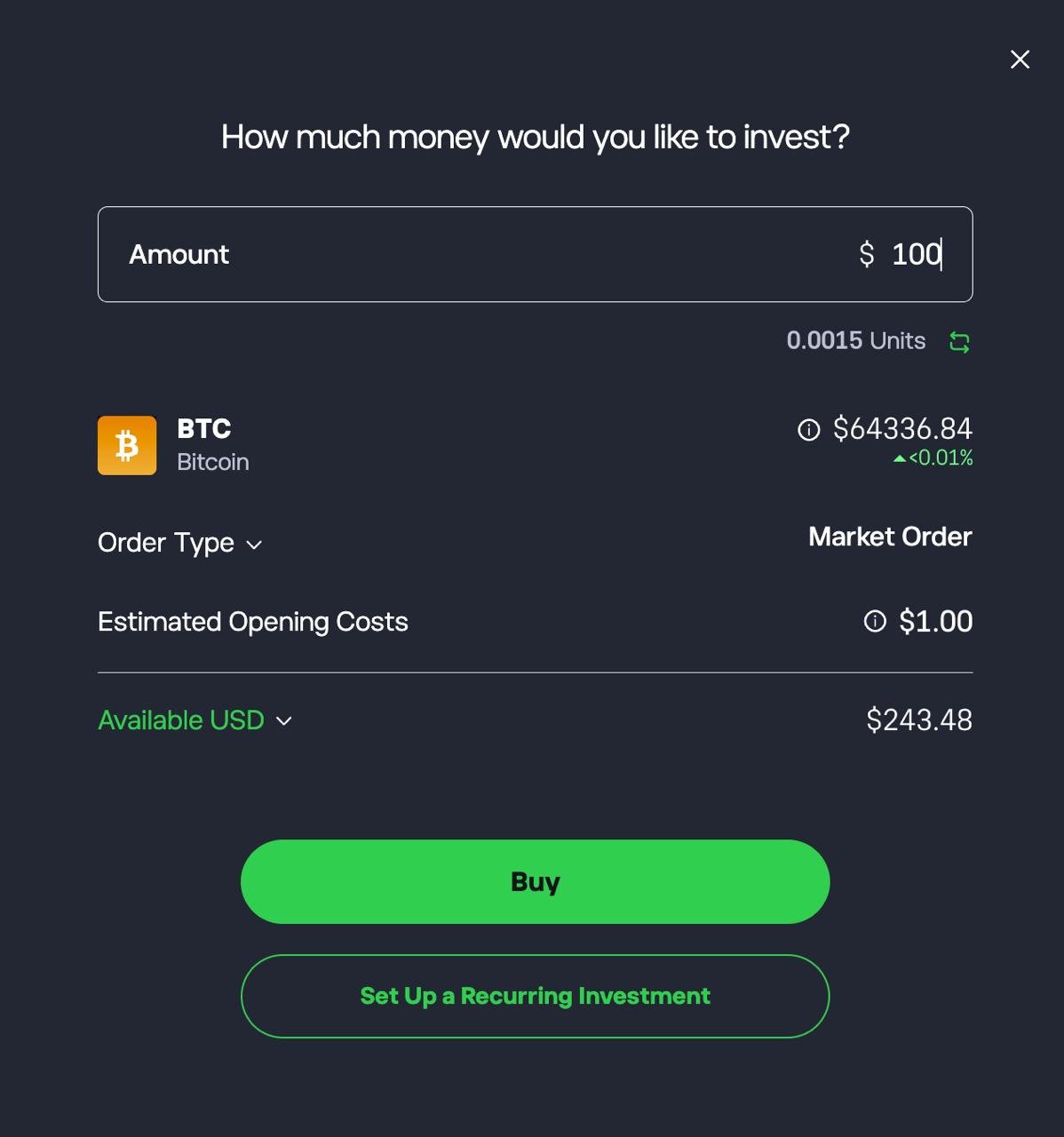
5. Set up and confirm your purchase
Enter the amount you want to invest, review the estimated units and opening costs, then tap Buy. You can also set up a recurring investment if you want to buy on a regular schedule.
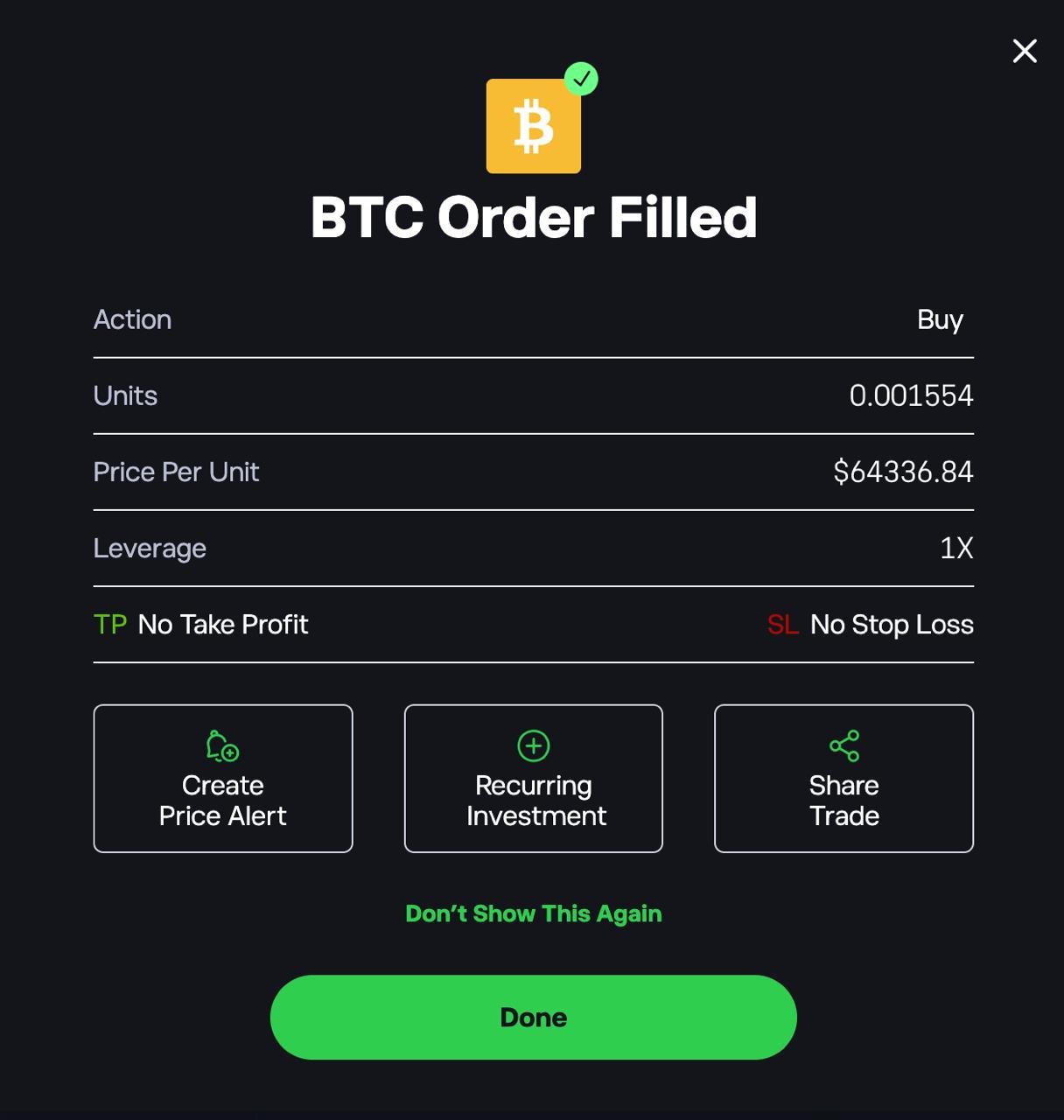
6. Check your order confirmation
Once your order goes through, you’ll see a confirmation showing the units bought, price per unit, and leverage. From here you can also set a price alert or share the trade.
What to look for when choosing an Australian crypto exchange
1. Compare the total cost, not just the advertised fee
An exchange’s headline trading fee is only one part of the cost.
Depending on the platform and payment method, you may also pay a spread, a card deposit fee, a currency conversion charge or a blockchain network fee when withdrawing crypto.
Check the price preview before confirming a purchase. Where possible, compare the quoted price with the market price and look for a separate fee line.
If you plan to trade regularly, compare the order-book interface with the platform’s standard buy screen: the difference can be significant.
2. Check AUD deposits and withdrawals
Australian exchanges and international platforms can offer different ways to fund an account.
PayID and bank transfers are useful options for Australians, but deposit processing times and fees vary. Card purchases may be quicker, yet can carry additional charges.
Also check how you can withdraw your money. A platform may offer free AUD withdrawals but charge a network fee for sending Bitcoin or another cryptocurrency to an external wallet.
If you expect to move money in and out regularly, both deposit and withdrawal conditions matter.
3. Understand the difference between an instant-buy service and an order book
An instant-buy service lets you purchase crypto at a quoted price without placing an order on a market.
It can be convenient for occasional purchases, but the price may include a spread and the fee may be higher.
An order book lets you place market or limit orders against other market participants.
It can give you more control over the price and may cost less, but it takes more time to learn.
A market order prioritises execution; a limit order lets you specify a price, but may not fill.
Before choosing an exchange, check which interface you will actually use.
A low advertised order-book fee is less useful if you only plan to use a more expensive instant-buy feature.
4. Check whether you can withdraw crypto to your own wallet
Buying cryptocurrency through an app does not automatically mean every asset or transaction can be transferred wherever you want.
Check whether the exchange supports external withdrawals for the coins you plan to buy, which networks are available, and what withdrawal fees apply.
If you want to hold your crypto in a personal wallet, make sure you understand the withdrawal process and how to secure your wallet.
Always confirm the asset, network and destination address before sending funds: crypto transfers sent to the wrong address or network may be irreversible.
5. Understand Australian registration and regulation
Before opening an account, check which Australian entity provides the service and search for it on AUSTRAC’s Virtual Asset Service Provider Register.
Registration is required for businesses that exchange or hold crypto for customers.
However, it is not an endorsement of an exchange, a guarantee of its solvency or a guarantee that customer funds will be recovered if something goes wrong.
An Australian financial services licence (AFSL) also does not mean every product offered by a provider is regulated in the same way.
For example, a licence may cover the shares and derivatives offered by leading trading platforms without covering ordinary spot cryptocurrency holdings.
Check the specific product and legal entity rather than relying on a general statement that a company is “regulated”.
You can check what a licence covers on ASIC’s professional registers.
From 8 April 2027, new laws will require crypto platforms that hold assets for customers to be licensed, subject to a transition period and an exemption for small platforms.
6. Consider security and account protection
Look for two-factor authentication, withdrawal confirmations, address whitelisting where available, and clear security settings.
Use a unique password and secure the email account linked to your exchange account.
If you hold a substantial amount of crypto for the long term, consider whether keeping it on an exchange fits your needs or whether one of the top-rated crypto wallets is more appropriate.
Self-custody gives you more direct control, but also makes you responsible for protecting your recovery phrase and signing transactions correctly.
Other crypto exchanges I considered but didn’t test
I considered several other cryptocurrency exchanges available to Australian users, but limited the hands-on comparison to the eight platforms reviewed above.
These alternatives may suit particular needs, but I haven’t tested them using the same process, so I haven’t included them in the rankings or assigned them a score.
- BTC Markets — An Australian exchange worth considering if you prefer an AUD trading pair and an order-book interface. I didn’t include it in my hands-on testing for this comparison.
- Digital Surge — An Australian platform offering AUD funding and a straightforward way to buy cryptocurrency. It may appeal to beginners who prefer a simpler buying experience, but I haven’t tested its fees and withdrawal process against the exchanges reviewed here.
- Coinstash — An Australian crypto platform worth a look if you want to explore a broad selection of digital assets. I haven’t tested its trading costs or compared its buying experience with the eight exchanges in this guide.
- Cointree — Another Australian-focused option for buying cryptocurrency with AUD. I didn’t test its fees, order types or withdrawal experience for this review.
- OKX — An international exchange with advanced trading tools. Its Australian product availability, AUD trading options and applicable fees should be checked before opening an account.
- Gemini — An additional exchange to investigate if you’re comparing international brands. I haven’t tested its current Australian onboarding, funding options or trading costs for this guide.
I’ve kept these platforms separate from the main ranking because I want the recommendations to reflect hands-on testing rather than a comparison based only on advertised features.
Availability, fees and regulatory requirements can change, so check each provider’s current Australian offering before depositing funds.
Final verdict: Which is the best crypto exchange in Australia?
Kraken is my top choice for active crypto traders, thanks to its Pro trading tools and access to market and limit orders.
For beginners, CoinSpot offers a straightforward way to buy crypto with AUD, while Binance is worth considering if low spot-trading fees are your priority.
eToro stands out for copy trading and multi-asset investing, while Swyftx is a strong alternative if you value simple AUD funding and recurring buys.
The biggest lesson from my testing is that the cheapest exchange depends on how you buy.
CoinSpot and CoinJar had some of the lowest estimated Bitcoin trading costs when I used their order-book interfaces, but their simpler buying options cost more.
Kraken and Coinbase also offered lower-cost advanced trading routes than their standard purchase flows.
Before choosing, compare the total cost of your intended trade, check AUD deposit and withdrawal options, and confirm that you can transfer your chosen cryptocurrency to an external wallet if needed.
Also check the provider’s current Australian regulatory status and the protections that apply to the specific product you plan to use.
There is no single best crypto exchange for everyone.
The right choice is the one that fits your experience, trading frequency and preferred features without making you pay unnecessarily for convenience.
Frequently asked questions
What is the cheapest crypto exchange in Australia?
In my testing, CoinSpot market orders and CoinJar Exchange had estimated A$1,000 Bitcoin round-trip costs of about A$3.50 and A$3.80 respectively. Binance was also low at about A$4.50. These figures apply to the specific routes tested, not necessarily to each platform’s default buy screen. Your actual cost can vary with order size, market conditions, spreads and fees.
Which Australian crypto exchange is best for beginners?
CoinSpot is a good starting point for Australians who want a straightforward app and free PayID deposits. Swyftx is another option for users who value simple AUD funding, recurring purchases and a demo mode. Compare the cost of the standard purchase flow before deciding, because convenience features can carry higher fees.
Can I deposit Australian dollars into a crypto exchange?
The exchanges in this comparison support AUD funding, although available methods and processing times differ. PayID and bank transfers are common options. Check the provider’s current deposit instructions, any applicable limits and whether your bank or payment method may impose separate restrictions.
Do I need to use an Australian crypto exchange?
Not necessarily, but Australians should check that a platform accepts Australian residents, supports the required AUD payment methods and meets applicable Australian requirements. Confirm which legal entity provides the service and whether the particular product you want to use is covered by relevant Australian regulation.
Do I pay tax on cryptocurrency in Australia?
Selling cryptocurrency, exchanging one crypto asset for another or using crypto to pay for goods and services can have tax consequences, depending on the circumstances. Keeping accurate records of transactions, fees, dates, values in AUD and transfers between wallets can help when preparing your tax return. For advice about your circumstances, consult the Australian Taxation Office’s current guidance or a qualified tax professional.
Should I keep my crypto on an exchange or in a personal wallet?
An exchange may be convenient for buying and selling, while a personal wallet can give you more control over assets you withdraw. Self-custody also means you are responsible for safeguarding your keys or recovery phrase. Consider your experience, security needs and plans for the assets before choosing how to hold them.
