

We’ve spent time comparing and testing Australia’s top trading apps to see which ones are genuinely worth using. The best stock trading apps in Australia in 2026 are eToro (best for beginners), Interactive Brokers (best for advanced investors), Pepperstone (best for active traders), Moomoo (best for CHESS-sponsored investing), and Tiger Brokers (best for low-cost global share access).
Choosing the right stock trading app depends on fees, market access, ownership structure, and how easy the trading platform is to use.
Some apps focus on simplicity for beginners, while others offer advanced tools, research, and global trading access for experienced investors.
- CopyTrading lets you mirror experienced investors' trades
- Multi-asset access: stocks, crypto, ETFs, forex, commodities
- Beginner-friendly interface with social/community sentiment feed
Capital at risk. T&Cs apply.
Top stock trading apps in Australia (2026)
- eToro: Best for beginners who want simplicity, with an easy-to-use mobile app and features such as social trading and copy portfolios.
- Interactive Brokers: Best for serious investors building global portfolios, known for very low FX costs and extensive international market access, though the platform can be more complex.
- Pepperstone: Best for active traders rather than long-term investors, offering fast execution and strong trading tools primarily for short-term trading strategies.
- Moomoo: Best for CHESS-sponsored long-term investing, offering low ASX brokerage, strong research tools, and a powerful mobile trading interface.
- Tiger Brokers: Best for low-cost global share investing, providing competitive brokerage and access to ASX, US, and Asian markets without ongoing account fees.
Key factors when choosing a stock trading app in Australia
- Fees: Compare brokerage costs and foreign exchange fees, especially when trading US or international stocks.
- CHESS sponsorship: Platforms with CHESS sponsorship allow shares to be registered directly in your name with the ASX, rather than held by the broker.
- Ease of use: Beginners often prefer apps with clean interfaces and simple order placement, while experienced traders may want advanced charting tools.
- Market access: Make sure the app provides access to the markets you want, such as ASX shares, US stocks, ETFs, or Asian markets.
- Trading style: Long-term investors may prioritise CHESS sponsorship and low brokerage, while active traders may focus more on execution speed and advanced tools.
Best trading apps Australia compared
| App | Mobile UX | Features | Fees | Markets | Ownership/Security | ASX Fee | US Fee | CHESS | Paper Trading | Best For |
|---|---|---|---|---|---|---|---|---|---|---|
| eToro | 8.5/10 | 5.5/10 | 6/10 | 7/10 | 6/10 | $2/trade | $2/trade + FX | No | Yes ($100k virtual) | Beginners wanting one app for stocks, crypto & forex |
| Moomoo | 9/10 | 9/10 | 7.5/10 | 6/10 | 9/10 | $3 or 0.03% | $0.99/trade | Yes | Yes ($1M virtual) | CHESS-sponsored ASX ownership + serious research tools |
| Interactive Brokers | 6/10 | 9.5/10 | 8.5/10 | 10/10 | 6.5/10 | $6 or 0.08% | from $1 | No | Yes | Advanced investors building global portfolios |
| Tiger Brokers | 7.5/10 | 7/10 | 7/10 | 7.5/10 | 8.5/10 | $3 (≤$10k) or 0.03% | $0.01/share (min $2) | Yes | Yes | Cost-conscious investors diversifying globally |
| Pepperstone | 5/10 | 8.5/10 | 6.5/10 | 6/10 | 3/10 | CFD only | CFD only | N/A | Yes | Active traders, not long-term share ownership |
How we score trading apps
We rate every app across five categories: mobile app experience, trading and research features, fees, market access, and ownership/security.
Each app gets a score out of 10 in every category, based on hands-on use of the platform and its published fee schedule — not on marketing claims.
- Mobile app experience — navigation, order flow, portfolio interface, stability, how much functionality carries over from desktop.
- Trading & research features — charting depth, alerts, screeners, paper trading, order types, data quality.
- Fees — ASX and US brokerage, FX conversion cost, and any account, data or withdrawal fees.
- Market access — breadth of exchanges and asset classes you can actually trade.
- Ownership & security — CHESS sponsorship vs. custodial holding, ASIC regulation, account protections.
Stock trading app Australia reviews
See our detailed partner reviews below, covering fees, features, security, and overall value across the top stock trading apps in Australia.
1. eToro – Best for beginners who want simplicity

Platform overview
| Feature | Details |
|---|---|
| Australian entity | eToro AUS Capital Ltd |
| AFSL | 491139 |
| Regulator | ASIC |
| Ownership model | Custodial (no CHESS) |
| Minimum deposit | $50 USD |
| Stock brokerage | $2 per trade |
| ETF brokerage | $0 commission |
| Account base currency | USD only |
| Withdrawal fee | $5 USD |
| Platforms | Web, iOS, Android |
Is this stock trading app ASIC-regulated in Australia?
Yes. eToro operates under eToro AUS Capital Ltd and holds AFSL 491139, regulated by ASIC. Australian clients are covered by local conduct and client money rules, though ASIC does not provide a government-backed compensation scheme if a broker fails.
Do you own the shares directly, or are they held in custody?
You buy real shares when trading without leverage, but they are held in custody, not via CHESS. There is no HIN and shares cannot be transferred to another broker. Dividends and voting rights are passed through where applicable.
How much does it cost to trade and hold shares on this app?
Stock trades cost $2 USD per trade, while ETFs are commission-free. There are no account or custody fees. The main extra cost is currency conversion, as all accounts are USD-based, with FX fees of around 1.5% when depositing or withdrawing AUD. A $5 USD withdrawal fee applies, and a $10/month inactivity fee only after 12 months without logging in.
Is the app easy to use for beginners and long-term investors?
Yes. eToro’s app is clean, intuitive, and beginner-friendly, with a low learning curve and a $100,000 demo account, similar to what you’ll find on leading demo trading accounts in Australia. Long-term investors will appreciate the simplicity, though research and reporting tools are more basic than traditional brokers.
What markets, shares, and features does this app support?
eToro supports ASX shares, major US and European stocks, ETFs, crypto, forex, and CFDs in one account. It focuses on large, liquid companies rather than small caps. Standout features include CopyTrader and Smart Portfolios, which makes it one of the more accessible copy trading platforms in Australia.
What is the mobile trading app actually like?
We found the eToro app built for someone who wants to open a position without a manual. The home screen leads straight into your portfolio and watchlist, the search bar surfaces stocks, crypto and forex from one box, and biometric login gets you in fast.
Placing a trade takes two or three taps: set the amount, confirm, done, and CopyTrader sits one tab away if you’d rather follow another investor than pick stocks yourself. The trade-off for that simplicity is customisation.
You can’t rearrange panels or dig into deep charting the way you can on a more trader-focused app. For checking a portfolio on the train or copying a trader from your phone, though, it’s about as frictionless as apps in this category get.
Who is this stock trading app best for?
eToro suits beginners and casual investors who want an easy-to-use app, low headline brokerage, and access to global markets and copy trading. It is less suitable for investors who want CHESS sponsorship, AUD-only accounts, or advanced research tools.
Read the complete eToro review here.
Pros & cons
- ASIC-regulated Australian entity
- $2 stock trades and $0 ETF brokerage
- Excellent mobile app and demo account
- Unique copy trading features
- Global market access
- No CHESS sponsorship
- USD-only accounts
- FX conversion fees
- $5 withdrawal fee
2. Interactive Brokers – Best for serious investors and global portfolios
Platform overview
| Feature | Details |
|---|---|
| Australian entity | Interactive Brokers Australia Pty Ltd |
| AFSL | 453554 |
| Regulator | ASIC |
| Ownership model | Custodial (no CHESS) |
| Minimum deposit | $0 (cash account) |
| ASX brokerage | $6 or 0.08% per trade |
| US brokerage | US$0.005 per share (min US$1) |
| Inactivity fee | None |
| FX conversion fee | ~0.002% (US$2 min) |
| Platforms | IBKR Desktop, TWS, Client Portal, Mobile apps |
Is this stock trading app ASIC-regulated in Australia?
Yes. Interactive Brokers operates locally under AFSL 453554 and is regulated by ASIC. The Australian entity is also an ASX participant and a member of AFCA. Globally, the group is heavily regulated across the US, UK, EU, Canada, and Asia, and the parent company is listed on NASDAQ, which adds a layer of financial transparency and scrutiny.
Do you own the shares directly, or are they held in custody?
Shares are held under a custodial model, not CHESS. You do not receive a personal HIN, but you retain full beneficial ownership, including dividends and voting rights. Client assets are segregated and typically held with institutional custodians such as BNP Paribas. This structure is standard for global brokers, though some Australian investors still prefer CHESS for simplicity.
How much does it cost to trade and hold shares on this app?
Costs are one of Interactive Brokers’ biggest strengths, though pricing isn’t beginner-simple. ASX trades cost $6 or 0.08%, whichever is higher. US shares are US$0.005 per share, with a US$1 minimum. There are no account, custody, or inactivity fees, and you get one free withdrawal per month.
FX conversion is extremely sharp at around 0.002%, but the US$2 minimum FX fee can sting if you deposit small amounts frequently. Overall, it’s an outstanding value for international and higher-balance investors.
Is the app easy to use for beginners and long-term investors?
It depends on the platform. IBKR GlobalTrader and Client Portal are usable for beginners and long-term investors, especially for simple buy-and-hold strategies. IBKR Desktop is powerful yet relatively approachable. Trader Workstation (TWS) is extremely capable but complex and best avoided by beginners. There’s a learning curve, but the tools grow with you rather than capping your capability.
What markets, shares, and features does this app support?
Interactive Brokers offers access to 90+ exchanges worldwide, including ASX, NYSE, Nasdaq, LSE, Euronext, HKEX, and more. You can trade shares, ETFs, options, futures, bonds, forex, CFDs (where eligible), and selected crypto products from one account. Standout features include fractional shares, advanced order types, overnight US trading, PortfolioAnalyst, recurring investments, and interest paid on idle cash balances above certain thresholds.
What is the mobile trading app actually like?
IBKR mobile is powerful, and it shows the moment you open it. Level II quotes, 90+ order types and algo/API access are all genuinely available from your phone, which is rare among the apps on this list.
That power comes with a learning curve: we found order tickets have more fields to fill in, and navigating between account types, markets and order routing options takes longer to feel natural than on a beginner-first app.
IBKR’s recent GlobalTrader redesign has softened some of that complexity for simpler trades, but the core experience is still built for someone who already knows what they’re doing. Worth it if you’re trading seriously across global markets, more than most casual investors need day to day.
Who is this stock trading app best for?
Interactive Brokers is best suited to serious long-term investors, active traders, and Australians building global portfolios. It excels if you care about low fees, international access, and advanced tools. It’s less ideal for beginners who want a simple, CHESS-sponsored Australian broker with minimal setup or decision-making.
Read the complete Interactive Brokers review.
Pros & cons
- ASIC-regulated with strong global oversight
- Extremely low brokerage and FX fees
- Access to 90+ global markets
- No inactivity or account fees
- Advanced tools and research
- No CHESS sponsorship
- Steep learning curve
- Complex fee structure
- Overkill for simple investors
3. Pepperstone – Best for active traders, not long-term investors
Platform overview
| Feature | Details |
|---|---|
| Australian entity | Pepperstone Group Limited |
| AFSL | 414530 |
| Regulator | ASIC |
| Ownership model | CFDs only (no share ownership) |
| Minimum deposit | $0 |
| Share trading | Share CFDs only |
| Stock CFD fees | $0.02 per share (min $0.20) |
| Inactivity fee | None |
| Withdrawal fee | $0 (AU clients) |
| Platforms | MT4, MT5, cTrader, TradingView, Pepperstone App |
Is this stock trading app ASIC-regulated in Australia?
Yes. Pepperstone is an Australian broker regulated by ASIC under AFSL 414530. It is also regulated by several top-tier overseas authorities, including the FCA (UK) and BaFin (Germany). Australian clients are onboarded locally and benefit from ASIC conduct rules, segregated client funds, and negative balance protection for retail CFD traders. There is no government-backed compensation scheme under ASIC.
Do you own the shares directly, or are they held in custody?
You do not own shares when using Pepperstone. All equity exposure is via share CFDs, meaning you are speculating on price movements rather than buying the underlying stock. This makes it one of the best CFD brokers in Australia.
There is no CHESS sponsorship, no HIN, and no voting or shareholder rights. This is a trading platform, not a traditional investing app.
How much does it cost to trade and hold shares on this app?
Pepperstone’s pricing is competitive for CFD traders. Share CFDs are charged at $0.02 per share with a $0.20 minimum, while forex and index CFDs are priced via tight spreads and commissions depending on account type. There are no account fees, no inactivity fees, and no withdrawal fees for Australian users. Holding CFD positions overnight incurs swap or financing fees, which can add up for longer-term positions.
Is the app easy to use for beginners and long-term investors?
Pepperstone’s platforms are powerful but not beginner-friendly in a traditional investing sense. MetaTrader and cTrader are industry standards for active trading, with fast execution and advanced charting, but they feel technical and crowded if your goal is long-term investing. Beginners interested in learning trading will be fine. Beginners looking to buy and hold shares will find it the wrong tool.
What markets, shares, and features does this app support?
Pepperstone offers access to 1,300+ CFD instruments, including forex, indices, commodities, cryptocurrencies, ETFs, and share CFDs across Australian, US, UK, and European markets. Some major US share CFDs trade 24/7. The platform supports algorithmic trading, expert advisors, advanced order types, and integrations with TradingView. All instruments are leveraged products.
What is the mobile trading app actually like?
Pepperstone isn’t really one app. It’s whichever platform you choose to trade through, since MT4, MT5, cTrader and TradingView integration all connect back to the same account.
We found cTrader the standout on mobile: fast order entry, proper depth-of-market data and genuinely professional charting for a phone screen. What you won’t find is a simplified, beginner-style interface; every platform option here assumes you already know what a pending order or an Expert Advisor is.
That’s by design: this is infrastructure built for active forex and CFD traders who want flexibility and speed, not a guided experience for someone opening their first position.
Who is this stock trading app best for?
Pepperstone is best for active traders who want low fees, fast execution, and access to global CFD markets. It suits short-term strategies, technical traders, and those already familiar with leveraged products. It is not suitable for investors who want to directly own shares, receive dividends, or build a long-term CHESS-sponsored portfolio.
Read the complete Pepperstone review here.
Pros & cons
- ASIC-regulated Australian broker
- Very low CFD trading costs
- No inactivity or withdrawal fees
- Excellent trading platforms
- Fast execution & tight spreads
- No real share ownership
- CFDs are high risk
- Not suitable for long-term investing
- No CHESS or dividends
4. Moomoo – Best for CHESS-sponsored long-term investing
Platform overview
| Feature | Details |
|---|---|
| Feature | Details |
| Australian entity | Moomoo Securities Australia Ltd |
| AFSL | 224663 |
| Regulator | ASIC |
| Ownership model | Direct share ownership with CHESS (ASX) |
| Minimum deposit | $0 |
| ASX brokerage | From $3 or 0.03% per trade |
| US brokerage | Low-cost / commission-free promos |
| Inactivity fee | None |
| Account fees | None |
| Platforms | Mobile app, desktop, web |
Is this stock trading app ASIC-regulated in Australia?
Yes. Moomoo operates in Australia under Moomoo Securities Australia Ltd, which holds AFSL 224663 and is regulated by ASIC. Client funds are held in segregated trust accounts, and the Australian business sits within the broader Futu Holdings group, a NASDAQ-listed company. As with all Australian brokers, ASIC oversight focuses on conduct and capital rules rather than providing a government-backed compensation scheme.
Do you own the shares directly, or are they held in custody?
For Australian shares, you own the shares directly via CHESS sponsorship. You receive your own HIN, and holdings are registered in your name with the ASX. This is a meaningful advantage over custodial-only platforms. International shares are held through a custodial structure, which is standard for offshore markets.
How much does it cost to trade and hold shares on this app?
Moomoo is aggressively priced. ASX trades start from $3 or 0.03% per trade, whichever is higher, with no account or inactivity fees. US stocks and ETFs are typically offered at very low cost, often commission-free under promotional pricing, though FX conversion spreads apply when trading overseas markets. There are no custody fees, making it cost-effective for both active traders and long-term holders.
Is the app easy to use for beginners and long-term investors?
Yes, and this is where Moomoo stands out. The app feels modern and intuitive, but it doesn’t dumb things down. Beginners get clean navigation, guided tools, and strong educational content. Long-term investors benefit from clear portfolio tracking and low ongoing costs. Power users will appreciate the depth of data without being forced into complex workflows.
What markets, shares, and features does this app support?
Moomoo supports ASX shares, US and Hong Kong stocks, ETFs, option trading, and fractional shares on select markets. A major strength is its advanced analytics, including Level 2 market data, detailed financials, smart screeners, technical indicators, and an active investor community feed. It also offers paper trading, alerts, and integration with professional-style charting tools rarely seen in zero-commission apps.
What is the mobile trading app actually like?
Opening Moomoo, the difference from eToro is immediate: this is a data-dense app built for people who want to look under the hood.
We had real-time Level 2 depth, a customisable watchlist and a stock screener within a tap or two, and flicking through 100+ technical indicators felt closer to a desktop terminal than a typical mobile broker app.
Biometric login and a clean order ticket keep the basics fast, but there’s genuinely more to learn here than on a simpler app; expect to spend longer finding your footing before the depth starts paying off.
The $1M paper trading account is a smart inclusion for exactly that reason: it gives you room to get comfortable with the interface before any real money is on the line.
Who is this stock trading app best for?
Moomoo is best for Australian investors who want CHESS-sponsored ASX ownership, low fees, and serious research tools in a modern app. It suits beginners who want room to grow, as well as experienced investors who value data and execution quality. Investors who need access to forex, bonds, or complex derivatives may need a secondary forex trading platform.
Read the complete Moomoo review here.
Pros & cons
- ASIC-regulated with CHESS sponsorship
- Very low ASX brokerage
- No account or inactivity fees
- Excellent research and analytics
- Strong mobile and desktop platforms
- Limited asset classes outside equities
- FX spreads apply on overseas trades
- No forex or bonds
- Can feel information-dense at first
5. Tiger Brokers – Best for low-cost global share investing

Platform overview
| Feature | Details |
|---|---|
| Australian entity | Tiger Brokers Australia Pty Ltd |
| AFSL | 300767 |
| Regulator | ASIC |
| Ownership model | CHESS-sponsored (ASX) |
| Minimum deposit | $0 |
| ASX brokerage | $3 or 0.03% per trade |
| US brokerage | US$0.01 per share (min US$2) |
| Inactivity fee | None |
| Account fees | None |
| Platforms | Tiger Trade (mobile & desktop) |
Is this stock trading app ASIC-regulated in Australia?
Yes. Tiger Brokers operates in Australia under Tiger Brokers Australia Pty Ltd, which holds an AFSL issued by ASIC. Client funds are held in segregated trust accounts, and the platform is a subsidiary of the NASDAQ-listed Tiger Brokers Group, adding a level of financial transparency. As with all ASIC-regulated brokers, there is no government-backed compensation scheme, but regulatory oversight and capital requirements apply.
Do you own the shares directly, or are they held in custody?
For Australian shares, Tiger Brokers now offers CHESS-sponsored accounts, meaning you receive your own HIN and shares are registered in your name on the ASX. This is a significant improvement over its earlier custodial-only setup. International shares, including US and Hong Kong stocks, are held via a custodial structure, which is standard for offshore markets.
How much does it cost to trade and hold shares on this app?
Tiger Brokers is priced to compete aggressively. ASX shares cost $3 or 0.03% per trade, while US shares are US$0.01 per share with a US$2 minimum. There are no account, inactivity, deposit, or withdrawal fees, which makes it friendly for investors with smaller or irregular balances. FX conversion fees apply when trading overseas markets, so costs rise slightly for frequent international trades.
Is the app easy to use for beginners and long-term investors?
The Tiger Trade app sits comfortably in the middle ground. Beginners may find the interface information-dense at first, but it’s logically laid out and improves with familiarity. Long-term investors benefit from solid portfolio tracking, fractional US shares, and no ongoing fees. Experienced users will appreciate the charting, order types, and customisable layouts.
What markets, shares, and features does this app support?
Tiger Brokers supports ASX, US, Hong Kong, and China A-share markets, plus US ETFs, options, and futures. Fractional US shares are available, making high-priced stocks more accessible. Features include real-time market data, advanced charting, stock screeners, an AI-powered research assistant, paper trading, and a high-interest cash account on uninvested funds. Notably, it does not support crypto, CFDs, forex, or indices.
What is the mobile trading app actually like?
Tiger Trade sits in the middle ground between eToro’s simplicity and Moomoo’s depth.
Candlestick charts, a solid stock screener and customisable layouts are all there, and switching between ASX, US and Asian markets inside the same app is straightforward once you know where to look.
It’s a capable, retail-grade charting experience rather than an institutional one. We didn’t find the same order-type depth as IBKR or the sheer indicator count of Moomoo, but for placing trades across multiple regions and checking a chart before you do, it does the job cleanly.
The demo account is a genuinely useful way to get familiar with the interface before funding it properly.
Who is this stock trading app best for?
Tiger Brokers is best suited to cost-conscious investors who want CHESS-sponsored ASX ownership and affordable access to US and Asian markets. It works well for small to medium portfolios and investors who trade occasionally but still want decent tools. Traders looking for derivatives, forex, or an all-in-one multi-asset platform will need a different broker.
Read the complete Tiger Brokers review.
Pros & cons
- ASIC-regulated with CHESS sponsorship
- Very low ASX and US brokerage
- No minimum deposit or inactivity fees
- Fractional US shares supported
- Strong mobile and desktop apps
- No crypto, forex, or CFDs
- FX fees on international trades
- Education content is limited
- Interface can feel busy
Which stock trading app is best for you?
Every platform on this page does something well, and the right one depends on what you’re actually trying to do.
Here’s how the five stack up on the questions people ask most.
- Best overall: eToro — the easiest platform to get started on, and the only one that lets you hold shares, crypto and forex in a single app rather than juggling separate accounts elsewhere.
- Best for beginners: eToro — a clean interface, guided order flow, and CopyTrader if you’d rather follow an experienced investor than build a portfolio from scratch.
- Best for ASX shares: Moomoo — CHESS-sponsored ownership at the same low $3-or-0.03% brokerage as Tiger, backed by the strongest charting and screener tools of any app on this list.
- Best CHESS-sponsored app: Moomoo — direct registration under your own HIN, not a pooled custodial holding, which matters most if you’re planning to hold ASX shares long term.
- Best for international shares: Interactive Brokers — access to 90+ global exchanges, well beyond the ASX/US/Asia coverage the other platforms offer.
- Best for low FX fees: Interactive Brokers — forex commission from 0.2 basis points makes converting AUD to trade overseas dramatically cheaper than the 50-55 pip spreads charged elsewhere on this list.
- Best for US shares: Interactive Brokers — the lowest per-share brokerage (from US$0.005) combined with the cheapest currency conversion means it wins on total cost, even though Moomoo’s flat $0.99 fee looks simpler on paper.
- Best for active traders: Pepperstone — sub-100ms execution, no restrictions on scalping or algo strategies, and a choice of MT4, MT5, cTrader or TradingView depending on how you like to trade.
- Best for research tools: Moomoo — Level 2 market depth, 100+ technical indicators and TradingView integration give it the deepest charting toolkit of the beginner-accessible apps.
- Best paper trading app: Moomoo — a $1M virtual portfolio, the largest practice balance on this list, and it runs on the same full toolset as the live app so what you learn actually transfers.
- Best for Asian market access: Tiger Brokers — the only platform here offering China A-shares alongside ASX, US and Hong Kong, useful if you want exposure beyond the usual Western markets.
- Best for low-cost global diversification: Tiger Brokers — CHESS-sponsored ASX trades at the same rate as Moomoo, plus cheap per-share US brokerage, without the higher entry point of Interactive Brokers.
How to place a trade on an Australian trading app?
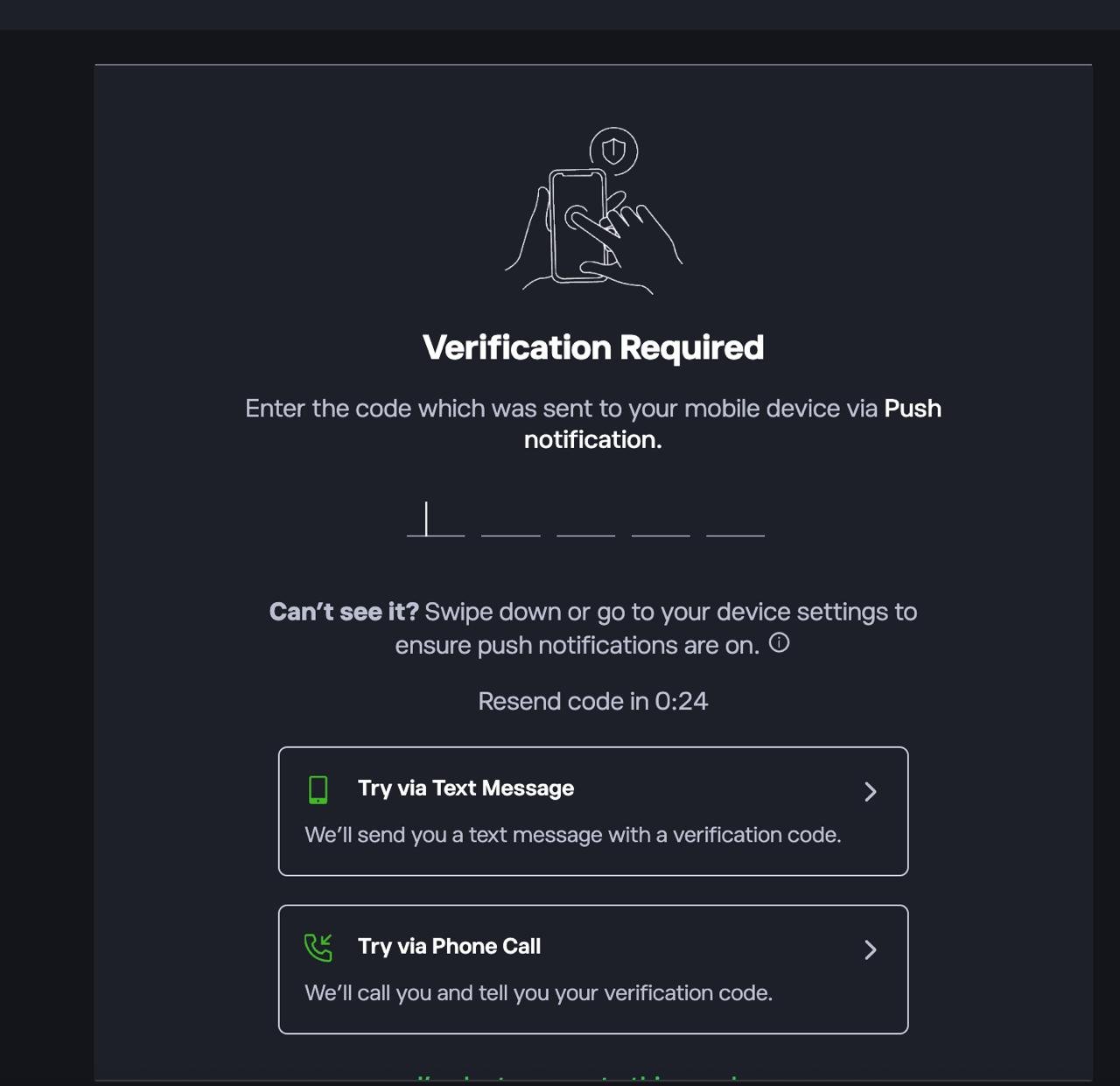
1. Log in to the platform
If prompted, complete 2FA by entering the code sent via push notification, SMS, or phone call.
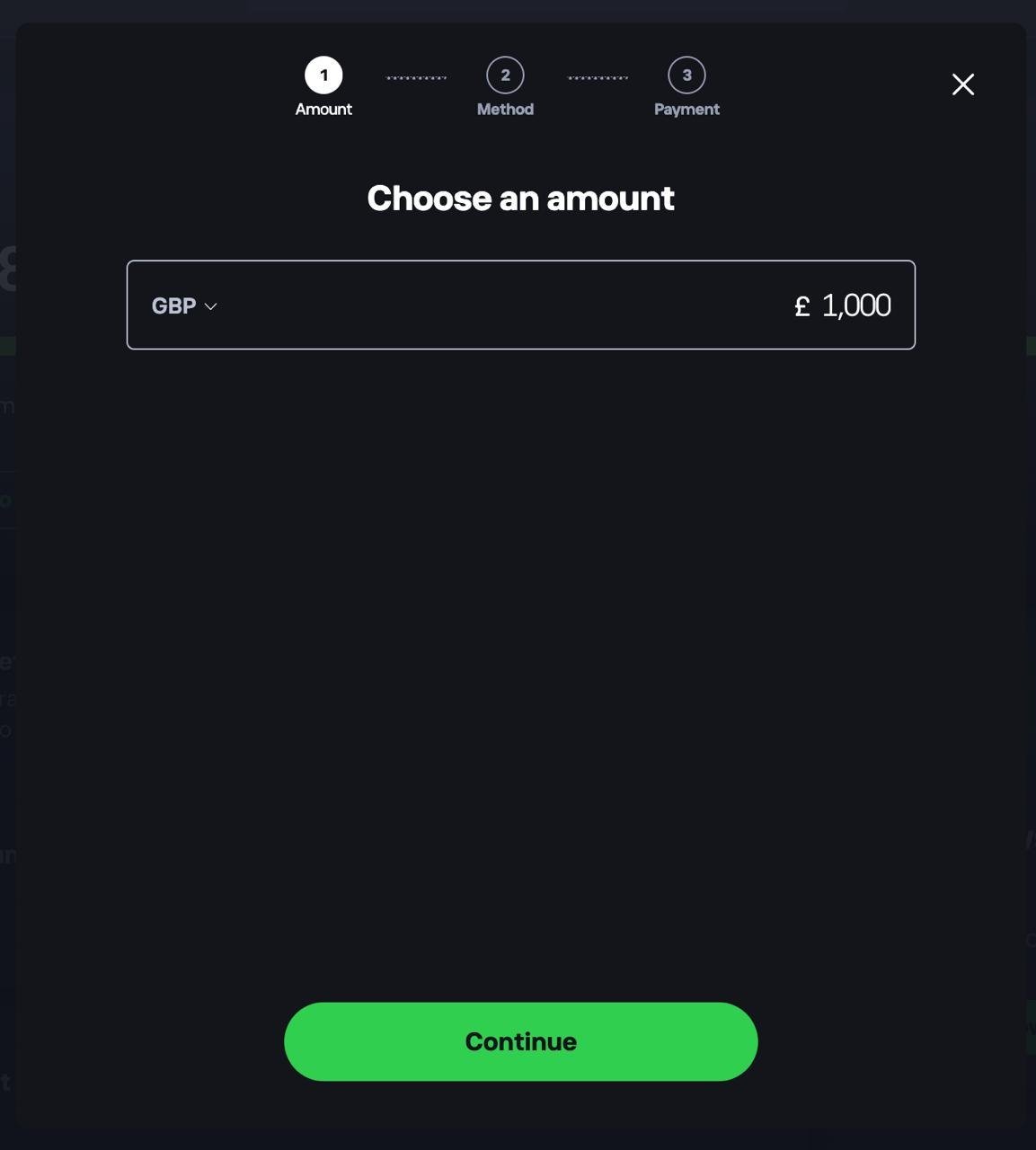
2. Deposit funds into your account
Head to your dashboard and choose to add funds. Select your currency, enter the amount you want to deposit, tap Continue, then choose a payment method.
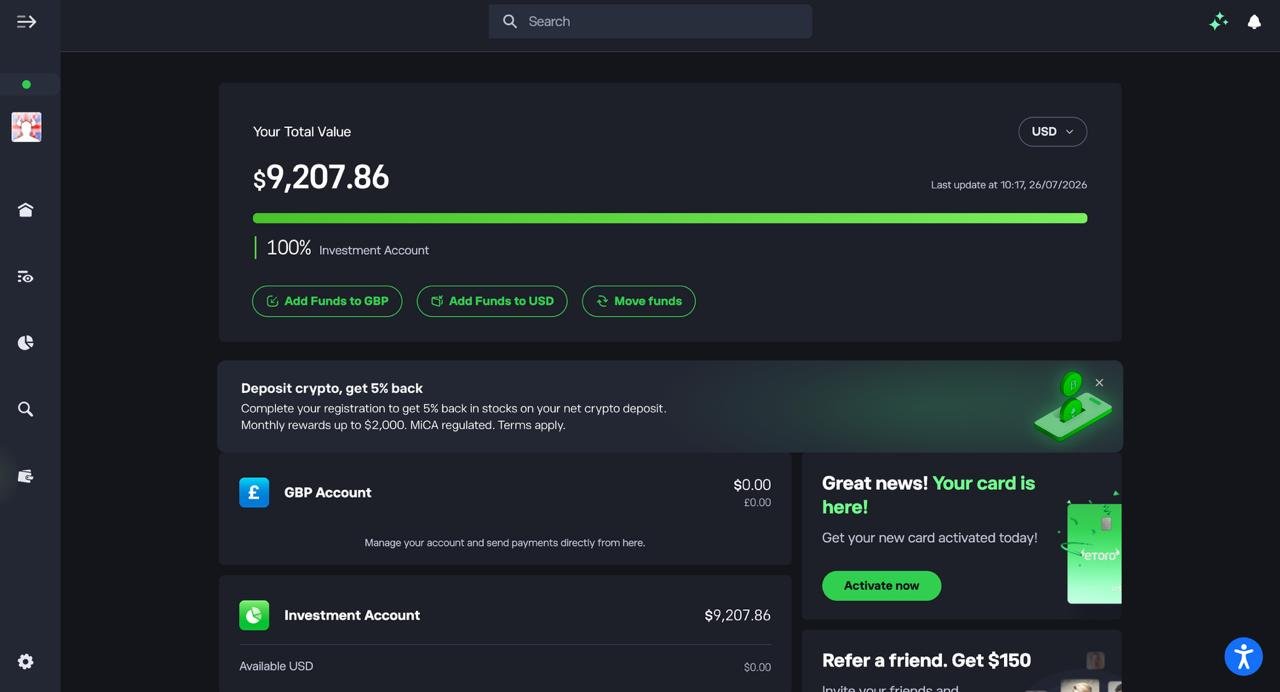
3. Confirm your funds are available
Check your dashboard to make sure your deposit has landed in your Investment Account before you start trading.
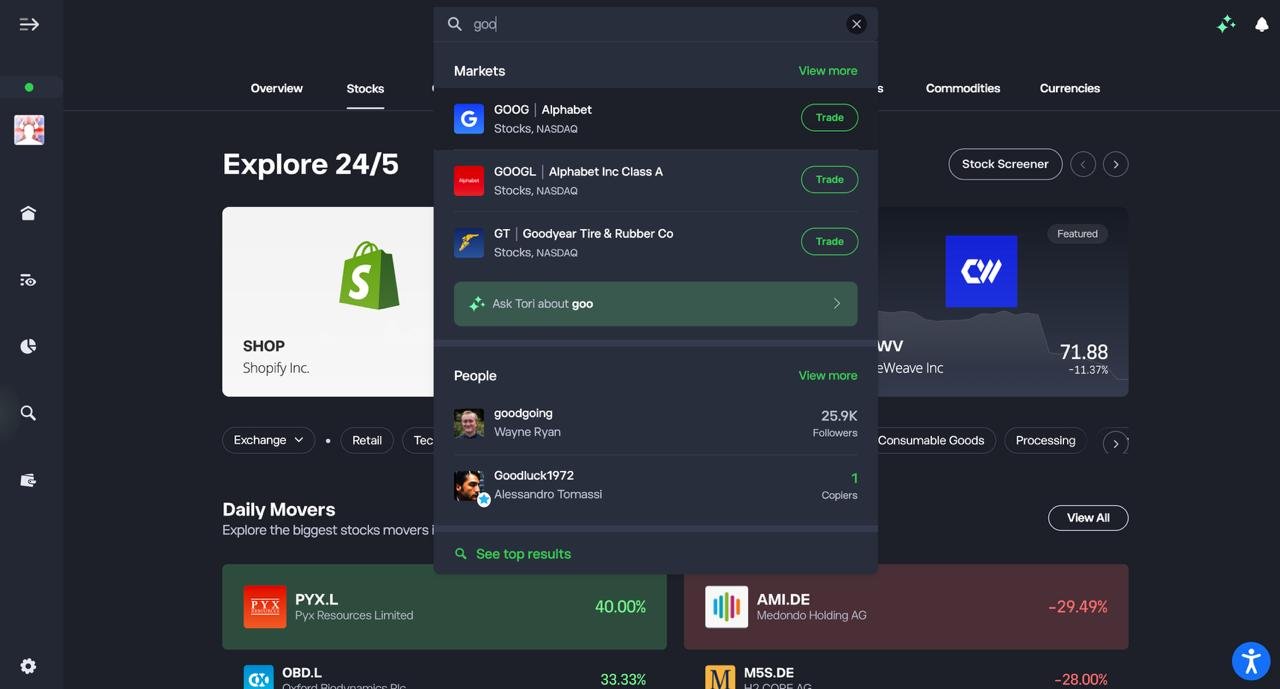
4. Search for the stock you want to trade
Use the search bar to type in the ticker or company name, then select it from the Markets results.
5. Set up and confirm your trade
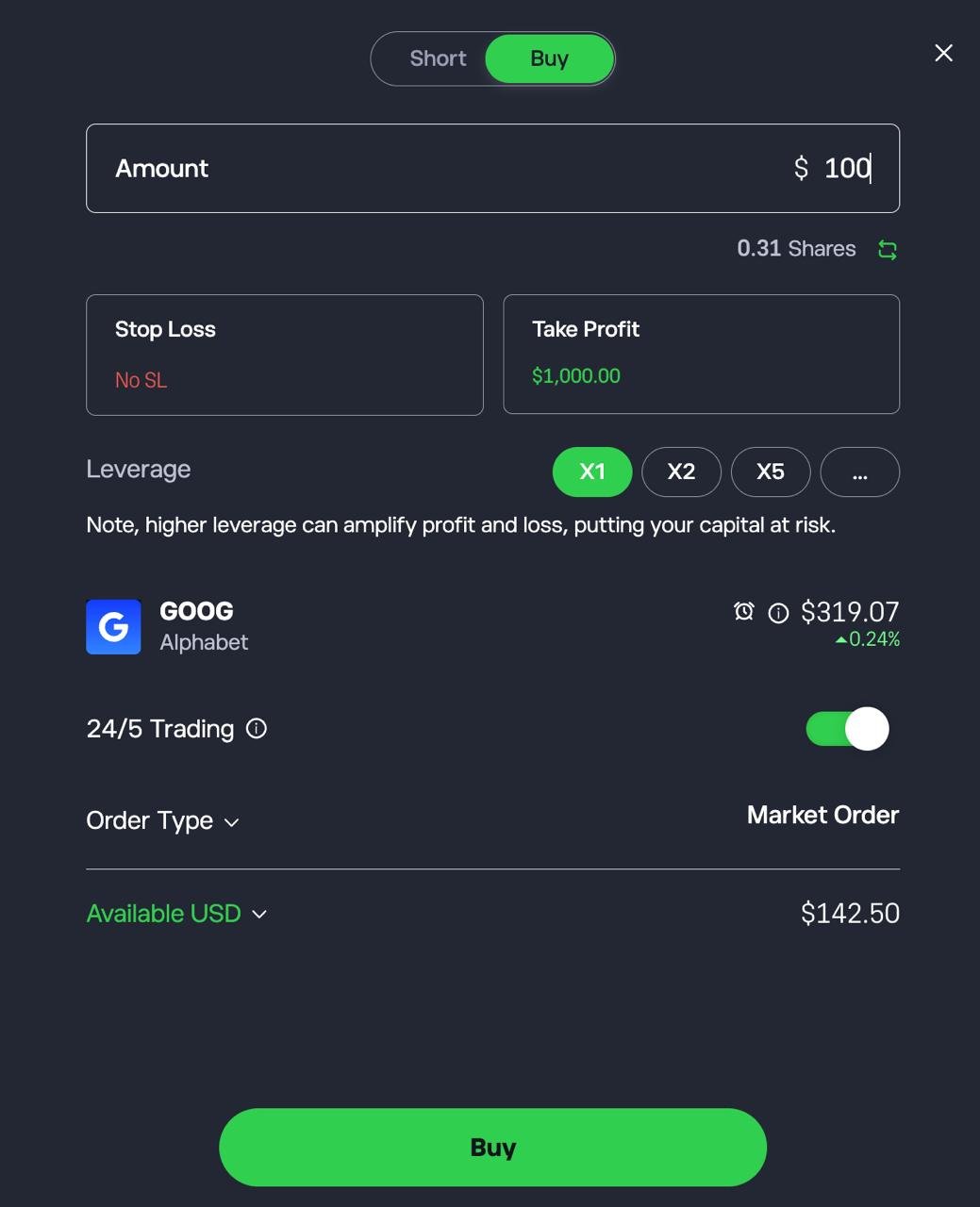
Choose Buy or Short, enter the amount you want to invest, optionally set a Stop Loss and Take Profit, then tap Buy or Short to confirm.
What is a trading app and how does it work?
A trading app is a mobile or web-based platform that lets you buy and sell financial assets directly from your phone or computer, without going through a traditional stockbroker.
In Australia, trading apps connect you to markets like the ASX, US exchanges, and sometimes global markets, allowing you to place trades, track your portfolio, and manage cash in real time.
At a practical level, here’s how a trading app works step by step:
- Open an account: You sign up with an Australian-licensed broker, verify your identity, and link a bank account. Most apps support AUD deposits via bank transfer or PayID, and many have no minimum deposit.
- Fund your account: Money you deposit sits in a regulated client trust account. Some apps also support multi-currency balances if you plan to invest overseas.
- Place a trade: You choose an asset, such as ASX shares, US stocks, or ETFs, then place a market order (buy at the current price) or a limit order (buy at a price you choose). The app sends this order to the exchange or liquidity provider.
- The trade is executed and settled: Once matched, the trade is executed instantly, but settlement usually occurs T+2 for shares. Ownership depends on the platform model:
- CHESS-sponsored apps register ASX shares directly in your name
- Custodial apps hold shares on your behalf
- Monitor and manage your portfolio: The app tracks prices, dividends, gains, and losses. Many apps include alerts, basic research, and tax reports to help you stay organised.
What can you trade on a trading app?
Most Australian trading apps support a mix of the following:
| Asset type | What it means |
|---|---|
| Shares | Buy ownership in Australian or international companies |
| ETFs | Invest in diversified funds that track indexes or sectors |
| Fractional shares | Buy part of a share instead of a whole unit |
| Options or CFDs | Advanced products for experienced traders only |
| Cash | Uninvested funds held in your account |
Not every app offers every asset. Some are designed for long-term investing, others for active trading.
How secure is trading through a mobile app in Australia?
Trading through a mobile app in Australia is generally secure when the broker holds an Australian Financial Services Licence (AFSL) and is regulated by ASIC, which enforces capital requirements and segregated client funds.
That’s a real safeguard, but not insurance: Australia has no government-backed compensation scheme like the UK’s FSCS, so if a broker collapses, what you recover depends on how your assets were held.
That’s why ownership structure matters as much as regulation:
| Ownership model | What it means for you |
|---|---|
| CHESS-sponsored (ASX) | Shares registered in your name with the ASX; they stay yours if the broker fails |
| Custodial | Broker holds shares on your behalf; you have beneficial ownership, but recovery can take longer in insolvency |
| CFDs | You don’t own the asset at all, only exposure to the broker’s ability to pay out |
CHESS sponsorship generally gives ASX investors a stronger legal claim than custodial or CFD structures, though it’s not a blanket guarantee against every risk, and it’s a moot point if you’re trading CFDs or global shares by design.
On top of that, every app on this list uses 2FA and biometric login as standard, plus device management and login alerts, which covers account takeover risk. It won’t protect you from phishing or a compromised device, which is where most real-world breaches actually start.
How can you choose the right trading app for your trading goals?
Choosing the right trading app in Australia comes down to matching the app to how you trade, not what looks cheapest or most popular. Fees matter, but structure, ownership, and usability matter more over time. The wrong app can quietly work against your strategy.
Start with your investing style
Before comparing apps, be clear on what you are trying to do.
- Long-term investor: buying ASX shares or ETFs and holding for years
- Global investor: building exposure to US and international markets
- Active trader: placing frequent trades, using charts and short-term strategies like day trading
- Beginner: learning the basics with small amounts and simple tools, especially if you are just starting to understand how to trade
Your style should eliminate half the market immediately. A CFD-heavy platform is not suitable for a long-term investor. A bare-bones investing app will frustrate an active trader.
Decide how important ownership is
In Australia, how shares are held is one of the biggest structural differences between apps.
| Ownership type | Best suited to | Why it matters |
|---|---|---|
| CHESS-sponsored | Long-term ASX investors | Shares are registered in your name with the ASX |
| Custodial | Global investors | Easier access to overseas markets |
| CFDs | Short-term traders only | No ownership, higher risk |
If you plan to hold Australian shares for years, CHESS sponsorship should be a priority. If you are focused on US stocks, custodial models are normal and often unavoidable.
Look past the headline brokerage
Low brokerage gets attention, but it is rarely the full cost.
Ask these questions:
- Are there FX conversion fees when trading overseas?
- Is there a minimum trade size?
- Are there inactivity or withdrawal fees?
- Does the platform charge for market data or advanced tools?
A $0 trade with a 1.5% FX spread can be more expensive than a $6 trade with tight currency pricing.
Match the app to your experience level
A good trading app should feel slightly challenging, not overwhelming.
- Beginners benefit from clean layouts, demo accounts, and simple order screens
- Experienced investors value custom charts, advanced order types, and deeper data
If the app pushes social feeds, leverage, or constant notifications, ask whether that supports your discipline or undermines it.
Check regulation and safeguards
Any app you use should be licensed and overseen by the Australian Securities and Investments Commission. ASIC regulation requires client money segregation and conduct standards, but it does not guarantee compensation if a broker fails. This makes ownership structure and cash handling policies especially important.
Conclusion: Choosing the best stock trading app in Australia
The best stock trading app in Australia depends on how you invest, not how flashy the app looks.
For long-term ASX investors who want direct ownership, Moomoo and Tiger Brokers stand out thanks to CHESS sponsorship, low fees, and solid tools.
If global market access and ultra-low FX costs matter more than simplicity, Interactive Brokers is hard to beat.
Beginners who value ease of use over structure may prefer eToro, while Pepperstone is best left to experienced traders who understand CFDs and short-term risk.
The common thread is simple. Pick the app that fits your goals, ownership preferences, and discipline, and ignore the rest.
FAQs
What is the best stock trading app in Australia for beginners?
For most beginners, eToro is the easiest place to start thanks to its simple interface, low minimum trade sizes, and demo account. That said, beginners who plan to invest long term in ASX shares may be better off starting with a CHESS-sponsored app to avoid switching later.
Do I really need CHESS sponsorship when trading shares?
If you are buying and holding Australian shares, CHESS sponsorship is strongly recommended. It means the shares are registered in your name with the ASX and remain yours even if the broker fails. It matters less for international shares, which are almost always held via custody.
Are stock trading apps safe to use in Australia?
Yes, provided the app is regulated by the Australian Securities and Investments Commission. ASIC regulation requires client money segregation and conduct rules, but it does not guarantee compensation if a broker collapses, which is why ownership structure still matters.
How much money do I need to start trading stocks?
Many Australian trading apps have no minimum deposit, and you can often start with as little as $50 to $100. Fractional shares on US stocks allow you to invest even smaller amounts, although costs matter more at low balances.
Are trading apps better than traditional brokers?
For most retail investors, yes. Trading apps are usually cheaper, faster, and easier to use than legacy brokers, with brokerage often under $6 per trade and no account fees. Traditional brokers may still suit investors who want advice or bundled banking services.
Can I trade international shares using an Australian trading app?
Yes. Most major apps offer access to US markets, and some support Hong Kong and other international exchanges. The main costs to watch are FX conversion fees and whether the app supports holding multiple currencies to reduce repeated conversions.
