

The best demo trading accounts in Australia in 2026 are Pepperstone for forex and CFD trading practice, Tiger Brokers and Moomoo for stock investors, eToro for beginners, and Interactive Brokers for advanced multi-asset traders. These platforms provide virtual trading environments using real market prices, allowing Australians to test strategies and learn platforms without risking real capital.
Demo accounts should closely replicate live trading conditions, including spreads, order execution, and platform tools. The best choice depends on what assets you plan to trade and which platform you expect to use when moving to a live account.
- CopyTrading lets you mirror experienced investors' trades
- Multi-asset access: stocks, crypto, ETFs, forex, commodities
- Beginner-friendly interface with social/community sentiment feed
Capital at risk. T&Cs apply.
Top demo trading platforms in Australia (2026)
- Best for forex and CFD traders: Pepperstone offers demo access to professional platforms such as MT4, MT5, and TradingView, allowing traders to practise with realistic spreads and test automated or algorithmic strategies.
- Best for low-cost ASX and US share investors: Tiger Brokers provides a demo environment suited to traders focused on Australian and US equities, with transparent brokerage and modern mobile trading tools.
- Best for fractional US shares and options trading: Moomoo offers strong analytics, fractional share access, and demo functionality that mirrors its live trading platform.
- Best for beginners and social trading: eToro provides a simple interface with virtual funds and copy trading features, making it ideal for new traders learning how markets work.
- Best for advanced multi-asset traders: Interactive Brokers offers a professional trading environment with global market access and complex order types, allowing experienced traders to test strategies before trading live.
Key considerations when choosing a demo trading account in Australia
- Realism: The best demo accounts replicate live market prices, spreads, and order execution, helping traders practise under realistic conditions.
- Platform features: Choose a demo account that provides the same charting tools, order types, and analytics available in the live platform.
- Asset coverage: Some demos focus on forex and CFDs, while others provide access to shares, ETFs, or options.
- Virtual balance: Most demo accounts offer large virtual balances so traders can practise risk management and position sizing.
- Transition to live trading: Ideally, the demo account should match the platform you intend to use for real trading.
What are the best demo trading accounts in Australia in 2026?
| Platform | Minimum Live Deposit | Asset Coverage in Demo | Demo Conditions | Platform Strength |
|---|---|---|---|---|
| Pepperstone | $0 recommended $200 | Forex, indices, commodities, share CFDs, crypto CFDs | Unlimited on cTrader and TradingView, 60 days MT4/MT5 | Best for forex, scalping and algorithmic trading |
| Tiger Brokers | $0 | ASX shares, US shares, HK shares, options, futures | $100,000 virtual funds, no fixed expiry | Best for low-cost share investing with CHESS |
| Moomoo | $0 | ASX shares, US shares, HK shares, options, crypto | Virtual funds, no strict expiry | Best for fractional US shares and advanced charting |
| eToro | $50 | Stocks, ETFs, forex, indices, commodities, crypto CFDs | $100,000 virtual funds, unlimited access | Best for beginners and copy trading |
| Interactive Brokers | No formal minimum | Stocks, ETFs, forex, options, futures, bonds, CFDs | US$1,000,000 paper account, 30 days without live funding | Best for advanced multi-asset and global trading |
Demo trading account Australia reviews
Review the best demo trading accounts in Australia based on platform usability, available markets, trading tools, and how closely each simulator reflects real market conditions for beginners.
1. eToro – Best for beginners and copy trading

Platform overview
| Key detail | Information |
|---|---|
| Legal entity (AU) | eToro AUS Capital Ltd |
| Regulator | Australian Securities and Investments Commission |
| AFSL | 491139 |
| Established | 2007 |
| Listed company | Listed on NASDAQ |
| Demo balance | $100,000 virtual funds |
| Demo expiry | No expiry |
| Minimum live deposit | $50 |
| Account base currency | USD only |
| Stock commission (AU clients) | US$2 per trade |
| Forex spread (EUR/USD) | From 1.0 pip |
| Crypto fee | 1% per trade |
| Withdrawal fee | US$5 |
| Inactivity fee | US$10 per month after 12 months |
| Platforms | Proprietary web platform and iOS/Android app |
| Copy trading | Yes, available in demo |
| Negative balance protection | Yes for Australian retail CFD clients |
| MetaTrader support | No |
How realistic is the trading environment?
The demo uses live market pricing and real spreads, making it one of the more authentic practice environments available to Australian traders. You receive $100,000 in virtual funds, and spreads reflect live conditions, such as around 1.0 pip on EUR/USD and typical index CFD spreads near 1.0 on the S&P 500.
Leverage, stop-loss settings and execution behave as they do in live mode. The main difference is emotional discipline, since no real capital is at risk.
Does the demo match the live trading platform?
Yes. The demo runs on the same proprietary web and mobile platforms as the live account. Interface, order types, charting tools, and portfolio tracking are identical.
You can place market, limit, stop-loss and trailing stop-loss orders. The copy trading platform (CopyTrader) is fully accessible in demo mode, allowing you to test social trading strategies before committing real funds.
How long can you use the demo account?
The demo account does not expire. You can switch between demo and live modes at any time using the same login.
There are no time restrictions or usage caps. Verification is only required when funding a live account.
What markets and instruments are included in the demo?
Australian clients under AFSL 491139 can test the full asset range, including:
- Over 6,000 stock CFDs
- 25 global exchanges including ASX, NYSE and NASDAQ
- Major forex pairs such as AUD/USD
- Indices and commodities
- More than 140 cryptocurrencies
- Real stocks and ETFs when using 1x leverage
Both leveraged CFD positions and non-leveraged real asset investing can be trialled.
Does the demo reflect real costs and risk controls?
Spreads and overnight financing reflect live trading conditions. For example, forex and index CFD costs are embedded in spreads, while crypto trading carries a 1% fee.
Non-trading fees such as the US$5 withdrawal fee, currency conversion costs when depositing AUD, and the US$10 inactivity fee are not meaningfully experienced in demo mode. Negative balance protection applies to Australian retail CFD clients in live accounts.
Who is this platform best for?
eToro’s demo is best suited to beginners, copy trading users, and investors exploring multi-asset portfolios. It is particularly useful for testing leverage, comparing stocks versus CFDs, and evaluating social trading strategies in a realistic environment.
It is less suitable for advanced traders seeking algorithmic trading, deep historical charting, or MetaTrader integration.
Read the complete eToro Review here.
Pros and cons
- $100,000 virtual funds
- Unlimited demo access
- Full access to CopyTrader in demo
- Wide multi-asset coverage
- ASIC-regulated Australian entity
- Account base currency is USD only
- Currency conversion fees in live accounts
- No MetaTrader 4 or 5 support
- Chart depth limited for advanced analysis
2. Pepperstone – Best for forex and CFD traders who want raw spreads and algorithmic testing

Platform overview
| Key detail | Information |
|---|---|
| Legal entity (AU) | Pepperstone Group Limited |
| Regulator | Australian Securities and Investments Commission |
| AFSL | 414530 |
| Established | 2010 |
| Listed company | No |
| Demo balance | Customisable virtual balance |
| Demo expiry | Unlimited on cTrader and TradingView, 60 days MT4/MT5 |
| Minimum live deposit | $0 recommended $200 |
| Account base currencies | AUD, USD, EUR, GBP, CHF, JPY, NZD, CAD, SGD, HKD |
| Forex spread (EUR/USD) | From 0.0 pips Razor |
| Commission (Razor) | $7 round turn per lot MT4/MT5 |
| Index CFD spread (S&P 500) | From 0.4 |
| Share CFD commission | From $0.02 per share |
| Withdrawal fee (AU) | $0 |
| Inactivity fee | None |
| Platforms | MT4, MT5, cTrader, TradingView, Pepperstone platform |
| Copy trading | Via third-party integrations |
| Negative balance protection | Yes for Australian retail clients |
| Real stocks or ETFs | No, CFDs only |
| Maximum retail leverage (AU) | 30:1 major FX |
How realistic is the trading environment?
Pepperstone’s demo closely mirrors its live ECN pricing model. On a Razor account, spreads start from 0.0 pips on major pairs like EUR/USD, with a $7 round-turn commission per lot on MT4 and MT5.
Pricing is sourced from multiple liquidity providers, and execution speed reflects the broker’s low-latency infrastructure. Spread fluctuations and commission costs behave as they do in live trading, making it suitable for strategy testing under realistic conditions.
Does the demo match the live trading platform?
Yes. The demo uses the same trading platforms available to live clients, including MetaTrader 4, MetaTrader 5, cTrader, TradingView and Pepperstone’s proprietary platform.
All key features are accessible, including Expert Advisors, algorithmic trading, advanced pending orders and one-click execution. If you plan to trade using automation or scalping strategies, the demo environment allows full testing.
Guaranteed stop losses are not available in live trading, and the demo reflects this.
How long can you use the demo account?
Pepperstone offers unlimited demo access on cTrader and TradingView. MT4 and MT5 demos typically last 60 days but can be reset if needed.
There is no deposit requirement to open a demo account. You can choose between Standard and Razor pricing structures when creating the demo, which is useful for comparing spread-only versus commission-based pricing.
What markets and instruments are included in the demo?
The demo includes access to more than 1,200 CFD instruments, including:
- Over 90 forex pairs
- 20+ global indices
- Major commodities such as gold and oil
- 800+ US share CFDs
- 150+ Australian share CFDs
- Cryptocurrency CFDs
All products are CFDs. You cannot purchase real shares or ETFs, which makes Pepperstone focused on active trading rather than long-term investing.
Does the demo reflect real costs and risk controls?
Yes. Spreads and commissions in the demo reflect live account pricing. Standard accounts embed costs in spreads averaging around 0.6–0.8 pips on majors. Razor accounts separate spread and commission.
There are no inactivity fees and no withdrawal fees for Australian clients. Overnight funding charges apply in live accounts and are visible in the demo environment.
Retail leverage is capped at 30:1 for major FX pairs under ASIC rules. Negative balance protection applies to Australian retail clients, although it is subject to market conditions.
Who is this platform best for?
Pepperstone’s demo is best suited to active forex and CFD traders who want to test tight spreads, ECN execution and automated strategies. It is particularly strong for scalpers and algorithmic traders using MT4, MT5 or cTrader.
It is less suitable for long-term investors seeking CHESS-sponsored ownership or ETF investing, since all instruments are traded as CFDs.
Read the full Pepperstone review here.
Pros and cons
- Raw spreads from 0.0 pips
- No inactivity or withdrawal fees
- Multiple professional platforms
- ASIC regulated
- Strong support for algorithmic trading
- CFDs only, no real shares
- MT4/MT5 demo limited to 60 days
- No guaranteed stop losses
- Overnight funding fees apply
- No investor compensation scheme in Australia
3. Moomoo – Best for fractional US shares and options trading

Platform overview
| Key detail | Information |
|---|---|
| Legal entity (AU) | Moomoo Securities Australia Ltd |
| Regulator | Australian Securities and Investments Commission |
| AFSL | 224663 |
| Established | 2018 |
| Parent company | Futu Holdings Ltd, listed on NASDAQ |
| Global users | 24+ million |
| Demo availability | Yes, free paper trading |
| Demo balance | Virtual funds, resettable |
| Demo expiry | No fixed expiry |
| Minimum live deposit | $0 minimum, $1 to activate |
| Account type | Cash account only, no leverage |
| CHESS sponsorship | Yes for ASX shares |
| Brokerage ASX | From $3 or 0.03% per trade |
| Brokerage US stocks | From US$0.99 per order |
| Options fee | From US$0.50 per contract |
| Crypto fee | From 0.49% transaction fee |
| Currency conversion (AUD to USD) | 50 pips spread |
| Platforms | Desktop, web, mobile app, TradingView integration |
| Negative balance protection | Not applicable, cash account |
| Real assets | Yes, stocks and ETFs |
| CFDs | No |
How realistic is the trading environment?
Moomoo’s demo account mirrors its live cash trading environment closely because the platform does not offer leverage or CFDs. Orders are placed using real market data, and the interface behaves exactly as it would in a funded account.
You can test ASX, US and Hong Kong stocks, ETFs and options using virtual funds. Because it operates as a cash account structure, the experience reflects real share ownership mechanics, including CHESS-sponsored ASX holdings. There is no simulated margin risk, which makes it realistic for investors rather than speculative traders.
Does the demo match the live trading platform?
Yes. The demo runs on the same desktop and mobile trading apps used by live clients. Chart layouts, watchlists, Level 2 market data, alerts and order types are identical.
You can test advanced order types including limit, stop, stop-limit, trailing orders and Good ‘til Cancel instructions. The platform includes more than 60 technical indicators, 38 drawing tools and deep order book data from Nasdaq TotalView and NYSE ArcaBook.
Changes made in demo mode reflect the same workflow as live mode, making the transition seamless.
How long can you use the demo account?
The demo does not have a strict expiry period. You can use it for as long as you need and reset virtual funds if required.
There is no minimum deposit to open a live account, and the demo can be accessed before committing capital.
Live account approval typically takes 1–3 business days moomoo au.
What markets and instruments are included in the demo?
Moomoo provides access to more than 22,000 markets globally. In Australia, clients can trade:
- ASX-listed shares and ETFs with CHESS sponsorship
- US stocks and ETFs including fractional shares
- Hong Kong stocks and ETFs
- US options
- Cryptocurrencies
- Futures markets
It does not offer forex, bonds or CFDs. That makes the demo more focused on direct market investing rather than leveraged trading strategies.
Does the demo reflect real costs and risk controls?
Brokerage fees are visible in the demo environment, allowing users to see flat-fee pricing structures such as $3 or 0.03% for ASX trades and US$0.99 for US stock trades.
Currency conversion costs are important for Australian investors buying US assets. Moomoo applies a 50 pip spread on AUD to USD conversions. While demo mode shows trade execution, actual FX conversion costs only apply in funded accounts.
Because accounts are cash-based, negative balance protection is not required. However, there is no investor compensation scheme in Australia if a broker fails. Client funds are held in segregated accounts, and the parent company Futu Holdings Ltd is NASDAQ-listed, which adds transparency.
Who is this platform best for?
Moomoo’s demo is best suited to equity investors and options traders who want to practise real share investing rather than leveraged CFD trading.
It is particularly strong for:
- ASX investors wanting CHESS-sponsored ownership
- Traders testing US options strategies
- Investors exploring fractional shares
- Users who value deep market data and advanced charting
It is less suitable for forex traders or those seeking margin-based speculative trading.
Read the full Moomoo review here.
Pros and cons
- CHESS-sponsored ASX trading
- Commission-competitive pricing
- Advanced charting and Level 2 data
- No inactivity fee
- Cash account reduces leverage risk
- No forex or CFD trading
- Currency conversion spread applies
- Limited account types
- No negative balance protection
- Wire withdrawal fees may apply
4. Interactive Brokers – Best for advanced multi-asset and global market traders

Platform overview
| Key detail | Information |
|---|---|
| Legal entity (AU) | Interactive Brokers Australia Pty Ltd |
| Regulator | Australian Securities and Investments Commission |
| AFSL | 453554 |
| Established | 1978 |
| Parent company | Interactive Brokers Group Inc, listed on NASDAQ |
| Global presence | 200+ countries and territories |
| Demo availability | Yes, free paper trading |
| Demo balance | US$1,000,000 virtual equity default |
| Demo expiry | 30 days without live account, ongoing for clients |
| Minimum live deposit (AU) | No formal minimum, practical funding required |
| Account base currencies | 20+ currencies including AUD and USD |
| Forex spread (EUR/USD) | From 0.1 pip equivalent |
| US stock commission | From US$0.005 per share |
| ASX commission | From 0.08% capped pricing |
| Platforms | Trader Workstation, IBKR Desktop, WebTrader, mobile app |
| Order types | 100+ order types and algorithms |
| Negative balance protection | Yes for retail clients under ASIC rules |
| Tradable instruments | Stocks, ETFs, options, futures, forex, bonds, CFDs |
How realistic is the trading environment?
Interactive Brokers offers one of the most realistic demo environments available. The paper trading account mirrors live market data and supports real-time pricing across global exchanges. By default, users receive US$1,000,000 in virtual equity, which can be adjusted.
Execution logic, order routing, and margin calculations behave the same way as live accounts. This includes smart order routing across exchanges, variable spreads in forex, and depth-of-market pricing. For experienced traders, this is a genuine simulation rather than a simplified sandbox.
Does the demo match the live trading platform?
Yes. The demo runs on the same professional-grade platforms used by live clients, including Trader Workstation (TWS), IBKR Desktop, and the mobile app.
You can test advanced functionality such as algorithmic order types, bracket orders, conditional trades and multi-leg options strategies. Over 100 order types are available, including VWAP, TWAP and adaptive algorithms.
There are no feature restrictions in the demo. If you can do it live, you can test it in paper trading mode.
How long can you use the demo account?
If you open a demo without funding a live account, access typically lasts around 30 days. Once you have an approved live account, paper trading remains available indefinitely alongside it.
You can switch between live and paper modes within the same login. This is particularly useful for testing new strategies before deploying capital.
What markets and instruments are included in the demo?
Interactive Brokers provides access to more than 150 global markets. The demo reflects this broad coverage, including:
- ASX-listed shares and ETFs
- US, UK, European, and Asian equities
- Forex trading across 100+ currency pairs
- Global index and commodity futures
- US and global options markets
- Bonds and fixed income products
- CFDs in selected regions
Does the demo reflect real costs and risk controls?
Yes. Commission structures, exchange fees, and margin requirements are visible in the demo environment. For example, US equities are typically charged from US$0.005 per share, and forex spreads can start from the equivalent of 0.1 pips depending on liquidity.
Margin calculations update dynamically, and risk metrics such as Value at Risk and real-time portfolio exposure are displayed. Retail leverage limits comply with ASIC regulations in live accounts.
Who is this platform best for?
Interactive Brokers’ demo is best suited to experienced traders, global investors and algorithmic users who want to test complex strategies in a realistic, institution-grade environment.
It is particularly strong for:
- Multi-asset portfolio traders
- Options and futures specialists
- Forex traders seeking tight spreads
- Investors managing multi-currency portfolios
It is less suited to beginners who want a simplified interface or guided investing experience. The platform is powerful but not designed to hold your hand.
Read the full Interactive Brokers review here.
Pros and cons
- Highly realistic execution environment
- Access to 150+ global markets
- Advanced algorithmic order types
- Multi-currency support
- Low institutional-level pricing
- Interface can feel complex for beginners
- Demo without live account expires after ~30 days
- Steeper learning curve
- Data subscriptions may apply in live accounts
- Not beginner-focused
5. Tiger Brokers – Best for low-cost ASX and US share investors

Platform overview
| Key detail | Information |
|---|---|
| Legal entity (AU) | Tiger Brokers (AU) Pty Ltd |
| Regulator | Australian Securities and Investments Commission |
| AFSL | 300767 |
| Established | 2014 |
| Parent company | UP Fintech Holding Ltd, listed on NASDAQ |
| Global users | 10+ million |
| Demo availability | Yes |
| Demo balance | $100,000 virtual funds |
| Demo expiry | No fixed expiry stated |
| Minimum live deposit | $0 |
| CHESS sponsorship | Yes for ASX shares |
| ASX brokerage | $3 or 0.03% per trade |
| US brokerage | US$0.01 per share, min US$2 |
| Fractional shares | Yes, US stocks |
| Currency conversion (AUD/USD) | 55 pips spread |
| Platforms | Tiger Trade desktop and mobile app |
| Negative balance protection | Not required for cash accounts |
| Supported assets | Shares, ETFs, options, futures |
| CFDs, forex, crypto | Not supported |
How realistic is the trading environment?
Tiger Brokers provides a demo account with $100,000 in virtual funds using live market pricing across ASX, US and Hong Kong markets. Orders execute within the same Tiger Trade interface used by live clients, so pricing, order flow and portfolio tracking feel authentic.
Because the platform focuses on direct share ownership rather than CFDs, the demo reflects real equity trading mechanics without simulated leverage distortion.
Does the demo match the live trading platform?
Yes. The demo runs on the same Tiger Trade desktop and mobile platforms as live accounts. Charts, watchlists, order types and analytics tools are identical.
You can test limit, market and stop-loss orders, explore fractional US shares and practise options strategies. The desktop layout offers depth, though beginners may find it busy at first.
How long can you use the demo account?
Tiger does not advertise a strict expiry period for demo accounts. You can practise without a forced upgrade timeline.
There is also no minimum deposit requirement to open a live account, making the transition straightforward.
What markets and instruments are included in the demo?
The demo includes access to:
- ASX-listed shares and ETFs with CHESS sponsorship
- US stocks and ETFs including fractional shares
- Hong Kong stocks
- US and Hong Kong options
- US futures
Forex, CFDs and cryptocurrency are not supported. This keeps the focus on equities and listed derivatives rather than leveraged trading.
Does the demo reflect real costs and risk controls?
Brokerage shown in the demo mirrors live pricing. ASX trades are typically $3 or 0.03% per order, while US shares are charged at US$0.01 per share with a US$2 minimum.
Currency conversion spreads apply in live accounts when converting AUD to USD, currently around 55 pips. While the demo reflects trade execution, actual FX costs only apply once real funds are used.
Since most accounts are cash-based, losses are limited to invested capital unless margin lending is activated in live trading.
Who is this platform best for?
Tiger Brokers’ demo is best suited to equity investors who want to practise trading Australian and US shares at competitive brokerage rates.
It works well for:
- Budget-conscious investors
- ASX investors who prefer CHESS-sponsored ownership
- Traders testing US options strategies
- Investors building diversified stock portfolios
It is less suitable for traders seeking forex, CFDs or crypto exposure.
Read the full Tiger Broker review here.
Pros and cons
- $100,000 virtual demo balance
- CHESS-sponsored ASX trading
- Competitive brokerage fees
- No minimum deposit
- Fractional US share access
- Desktop platform can feel busy
- Currency conversion spreads apply in live mode
- Limited educational resources
- Not designed for high-frequency traders
How to place a trade on an Australian demo trading account?
1. Log in to the platform
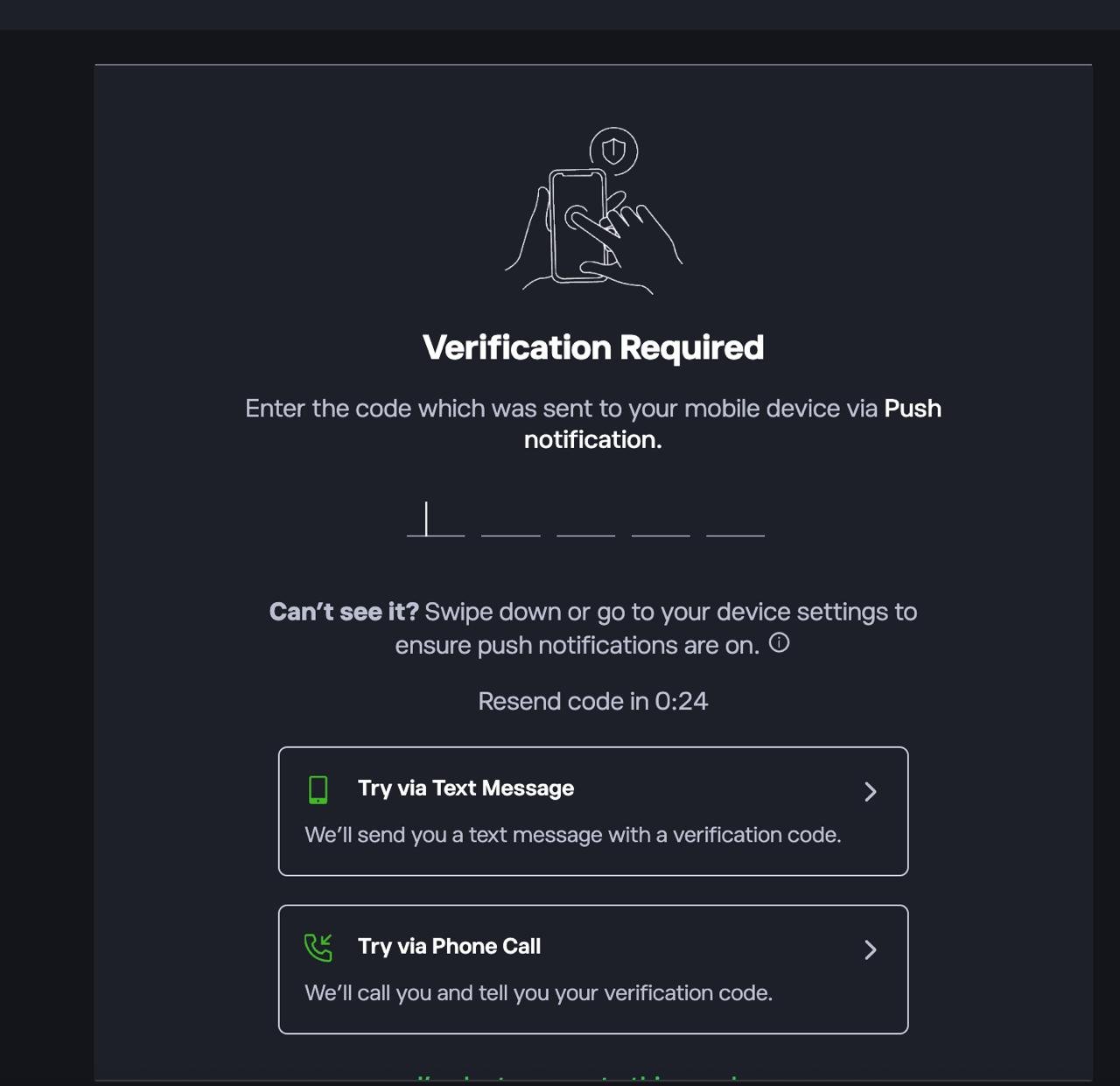
If prompted, complete 2FA by entering the code sent via push notification, SMS, or phone call.
2. Deposit funds into your account
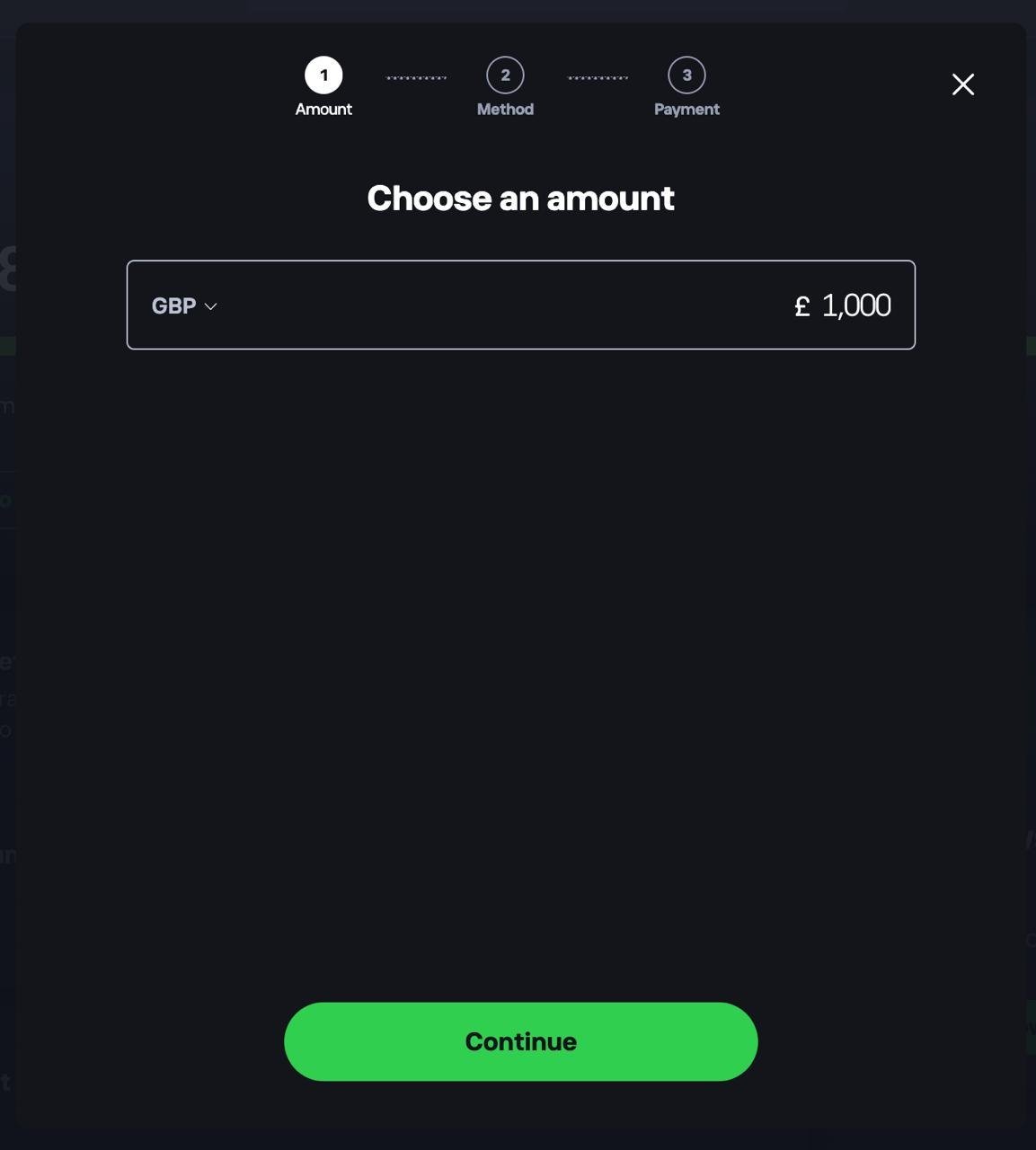
Head to your dashboard and choose to add funds. Select your currency, enter the amount you want to deposit, tap Continue, then choose a payment method.
3. Confirm your funds are available
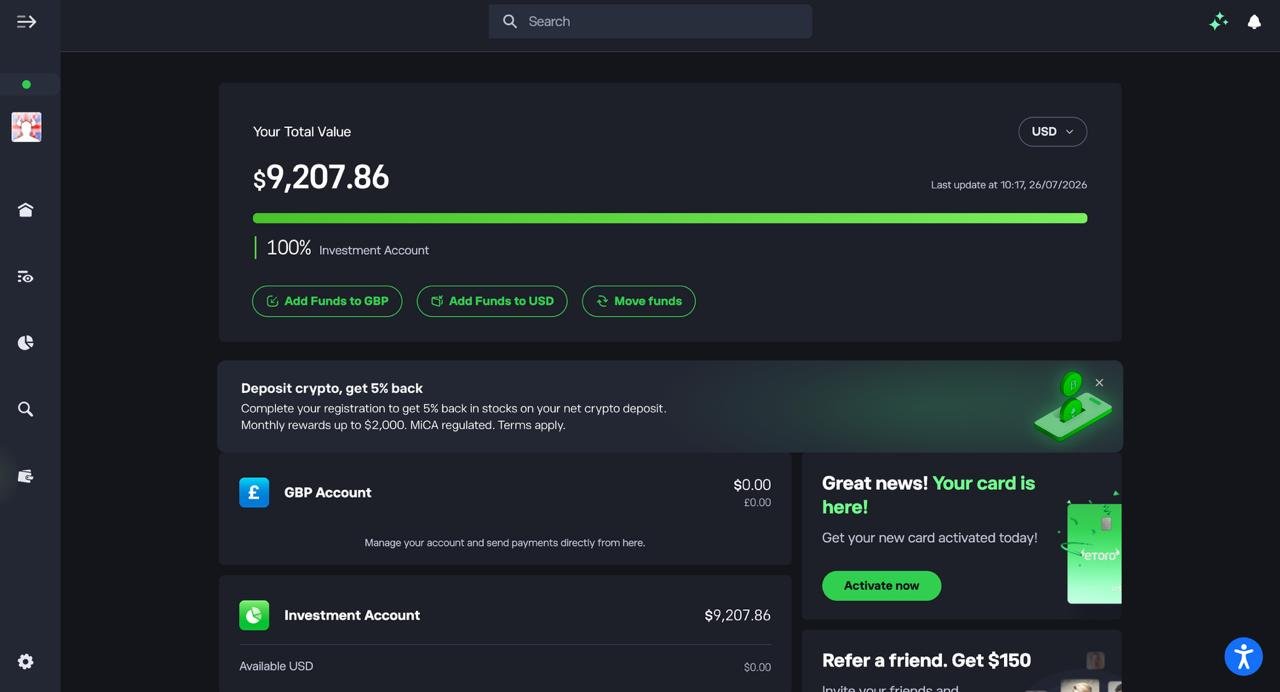
Check your dashboard to make sure your deposit has landed in your Investment Account before you start trading.
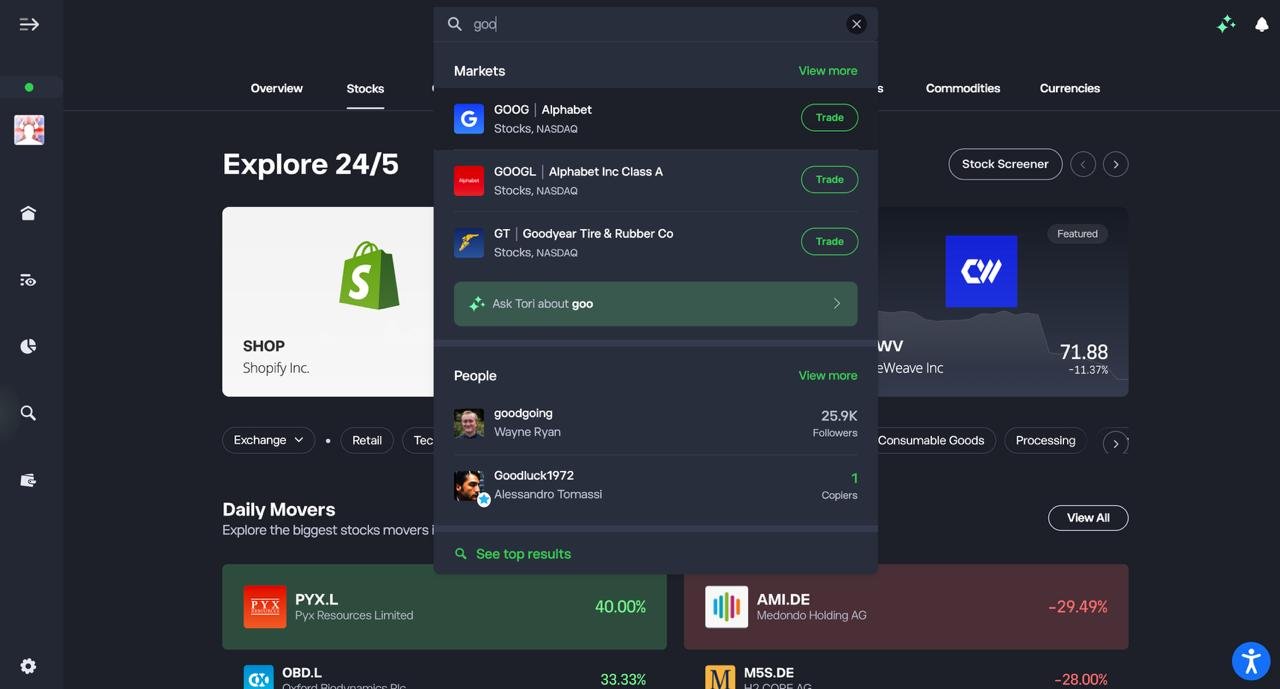
4. Search for the stock you want to trade
Use the search bar to type in the ticker or company name, then select it from the Markets results.
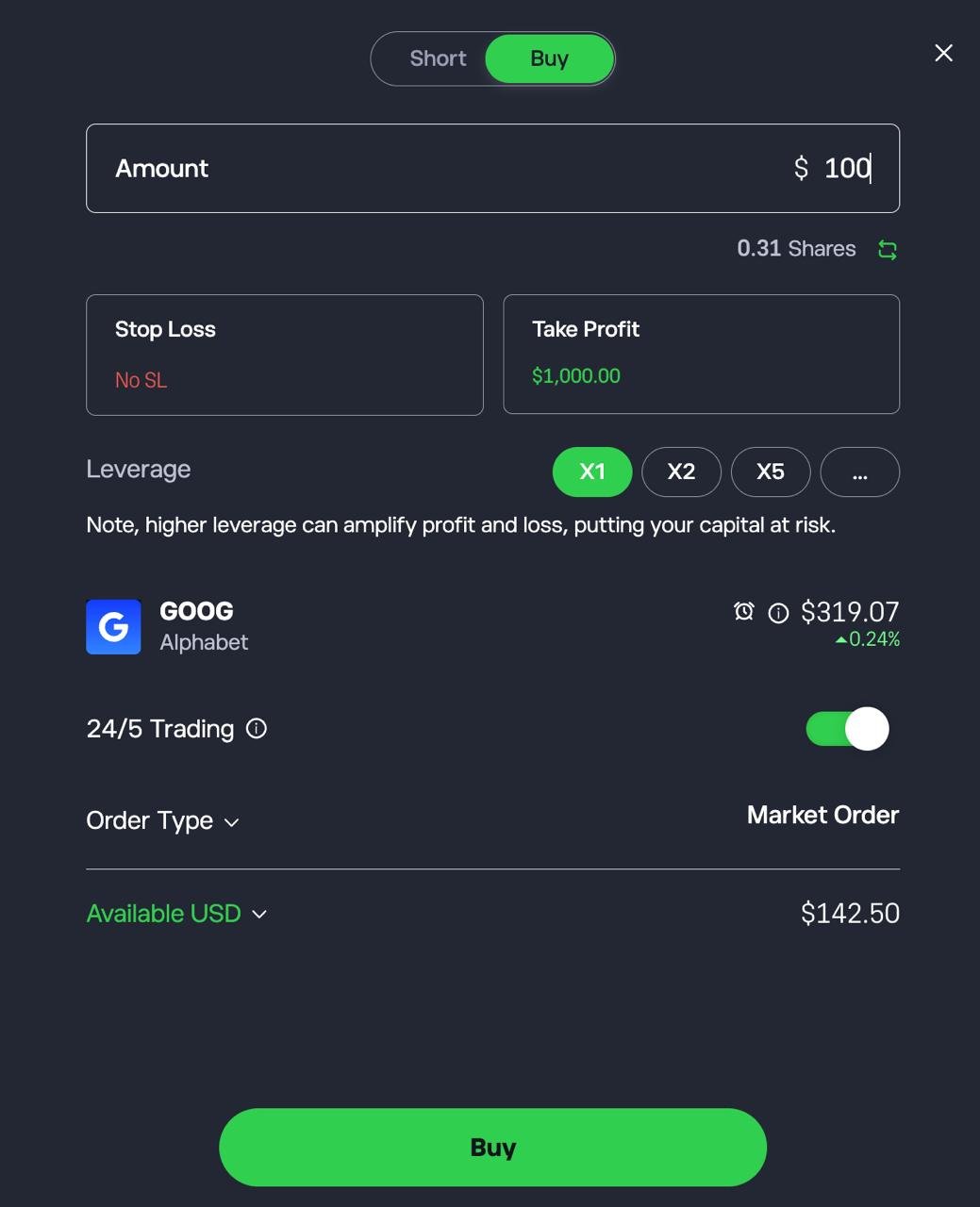
5. Set up and confirm your trade
Choose Buy or Short, enter the amount you want to invest, optionally set a Stop Loss and Take Profit, then tap Buy or Short to confirm.
What is a demo trading account?
A demo trading account is a simulated trading environment that lets you practise buying and selling financial instruments using virtual money instead of real funds. It mirrors live market prices and platform tools, allowing you to test strategies, learn order types and understand risk without putting capital on the line.
In practical terms, a demo account gives you a set amount of virtual balance, often $50,000 to $100,000, and access to the broker’s real trading platform. You can place market, limit and stop-loss orders, monitor charts, and track profit and loss exactly as you would in a live account. The key difference is that gains and losses are not real.
How does a demo trading account work?
A demo account connects to live or delayed market data and replicates real trading conditions. When you place a trade, the platform simulates execution based on current prices and spread conditions.
Most Australian brokers provide:
- Live pricing across forex, shares, indices or crypto
- Virtual balances between $50,000 and $1,000,000
- Full access to charting tools and indicators
- Risk management tools such as stop-loss and take-profit orders
- The same desktop and mobile apps used for live trading
The experience is designed to feel authentic. However, there are limits. Slippage may be less pronounced, liquidity constraints are often simplified, and the psychological pressure of risking real money is absent.
What can you practise with a demo account?
A demo account is more than a beginner tool. It is commonly used by both new and experienced traders to refine execution and test ideas before going live.
You can practise:
- Learning how different order types work
- Testing leverage and margin mechanics
- Backtesting trading strategies in live conditions
- Comparing spreads and commission structures
- Evaluating platform speed and stability
- Understanding how overnight financing charges affect positions
For investors using share trading platforms, demo accounts can also help you understand brokerage calculations, currency conversion costs and portfolio diversification before funding your account.
Is a demo account the same as real trading?
Technically, yes in structure. Emotionally, no.
The interface, pricing feed and trade mechanics are usually identical to a live account. If a broker is regulated by the Australian Securities and Investments Commission (ASIC), its live trading conditions must comply with local leverage caps, disclosure rules and client money protections.
However, demo trading removes emotional risk. There is no fear of loss, no pressure from real capital drawdown, and no behavioural bias linked to actual financial impact. That gap matters. Many traders perform well in demo mode but struggle when real money is involved.
Are demo accounts free?
Yes. Demo accounts are almost always free and require no deposit. Some brokers limit access to 30 days, while others allow unlimited use.
There are no trading fees because no real trades are executed. However, spreads and commissions shown inside the demo reflect live pricing structures, giving you a realistic preview of costs.
Who should use a demo trading account?
A demo account is suitable for:
- Beginners learning the basics of trading
- Investors comparing platforms before choosing a broker
- Experienced traders testing new strategies
- Anyone wanting to understand leverage risk under ASIC rules
- Users transitioning from long-term investing to short-term trading
What are the pros and cons of demo trading accounts?
Demo trading accounts let you practise in live market conditions without risking real money, which makes them one of the safest ways to learn how trading platforms work.
However, they also remove the emotional pressure and real-world frictions that define actual trading. Used properly, they are a powerful training tool. Used carelessly, they can create false confidence.
What are the main advantages of demo trading accounts?
The biggest benefit is simple: zero financial risk. You can make mistakes, test strategies and explore different markets without losing capital.
Key advantages include:
- Risk-free learning: You can practise placing market, limit and stop-loss orders without exposing real funds. This is especially useful for understanding leverage limits under ASIC rules, where retail clients are capped at 30:1 on major forex pairs and lower on more volatile assets.
- Platform testing: A demo lets you evaluate execution speed, charting tools, mobile usability and order types before committing money. That matters because switching brokers later can be inconvenient.
- Strategy development
Experienced traders use demo accounts to trial new systems, test risk-reward ratios and refine position sizing. You can assess whether a strategy holds up in live pricing conditions. - Cost transparency: Spreads, commissions and overnight financing are usually reflected in demo mode. That allows you to see how a 1.0 pip spread or a $7 per lot commission affects performance before going live.
- Confidence building: For beginners, the learning curve can be steep. A demo reduces the initial fear factor and allows you to understand market mechanics at your own pace.
What are the main disadvantages of demo trading accounts?
The core limitation is psychological. Trading without financial consequence is not the same as trading with your own money.
Key drawbacks include:
- No emotional pressure: Real trading involves fear, greed and hesitation. Demo trading does not. Many traders perform well in simulation but struggle once real losses become possible.
- Unrealistic execution conditions: While pricing is usually live, slippage, liquidity constraints and order rejection may be simplified. In fast markets, live execution can behave differently.
- Overconfidence risk: Large virtual balances such as $100,000 or $1,000,000 can distort risk perception. Beginners may take oversized positions that would be unrealistic in a funded account.
- Limited behavioural feedback: You cannot properly test discipline, drawdown tolerance or capital management psychology without real exposure.
- Temporary access: Some brokers restrict demo accounts to 30 or 60 days, which limits long-term strategy testing unless you open a live account.
Pros and cons at a glance
| Feature | Advantage | Limitation |
|---|---|---|
| Financial risk | No capital at risk | No emotional realism |
| Market data | Often live pricing | Slippage may differ from live |
| Strategy testing | Safe experimentation | Performance may not translate |
| Platform access | Full access to tools | Time limits at some brokers |
| Cost visibility | Spreads and fees visible | Real financing impact only felt live |
Are demo accounts worth using?
Yes, with a clear purpose. A demo account is excellent for learning mechanics, comparing brokers and stress-testing strategy logic. It is not a substitute for real trading experience.
The most effective approach is structured: use a demo to understand execution and refine risk management rules, then transition to small live positions. That shift introduces emotional discipline while keeping risk controlled.
How do you transition from demo to live trading?
You transition from demo to live trading by reducing position size, tightening risk controls and treating your first live trades as a psychological adjustment rather than a profit opportunity. The goal is not to replicate demo returns. It is to adapt to real capital risk under Australian regulatory conditions.
Moving from virtual to live money is where most traders struggle. Execution mechanics stay the same. Emotions do not.
Step 1: Prove consistency in demo mode
Before going live, your demo results should show consistency, not just one profitable week.
Look for:
- At least 20 to 30 consecutive trades
- A defined risk per trade, typically 1% or less of account size
- A clear risk-to-reward ratio, ideally 1:1.5 or higher
- Controlled maximum drawdown
If your results depend on oversized positions or aggressive leverage, they will not translate well into live trading.
Under ASIC rules, retail leverage is capped at 30:1 for major forex pairs and lower for more volatile assets. Your demo strategy should already reflect those limits.
Step 2: Reduce your starting capital expectations
When you open a live account, start smaller than your demo balance.
If you traded with $100,000 in demo funds, that does not mean you should deposit $100,000 live. Many Australian traders begin with a modest amount to manage emotional exposure while preserving capital.
Your first objective is not growth. It is execution discipline.
Step 3: Trade smaller than you think you need to
Position size is where most transitions fail.
Cut your demo position size by at least 50% when you go live. If your strategy risks 1% per trade in demo, consider risking 0.5% initially in live conditions.
Smaller size reduces:
- Emotional stress
- Impulse exits
- Revenge trading
- Overreaction to short-term losses
This stage is about adaptation, not maximisation.
Step 4: Expect psychological friction
Live trading introduces variables you never fully feel in demo mode:
- Hesitation before entering trades
- Closing winners too early
- Holding losers too long
- Fear after consecutive losses
These behaviours are normal. The solution is structure. Pre-define entry, stop-loss and take-profit levels before you place a trade. Use platform tools such as bracket orders or stop-loss automation where available.
Step 5: Monitor real costs closely
Demo accounts usually reflect spreads and commissions, but live trading makes costs tangible.
Pay attention to:
- Spread widening during volatility
- Overnight financing charges on leveraged positions
- Currency conversion spreads if trading US assets from AUD
- Exchange and regulatory fees on share trades
These factors affect net profitability more than most beginners realise.
Step 6: Keep a live trading journal
Your first 30 live trades should be documented.
Record:
- Entry reason
- Risk amount
- Outcome
- Emotional state
- Whether you followed your plan
Patterns will appear quickly. Discipline gaps are easier to correct early.
Demo vs live trading differences
| Factor | Demo trading | Live trading |
|---|---|---|
| Capital risk | None | Real financial impact |
| Emotional pressure | Low | High |
| Execution mechanics | Simulated | Real market liquidity |
| Cost impact | Visible but theoretical | Directly affects returns |
| Behavioural discipline | Easier | Harder |
When are you ready to scale up?
Scale position size only after:
- At least 30 to 50 live trades
- Stable risk management
- No impulsive deviations from your strategy
- Comfort with normal drawdowns
Increasing size too early is the fastest way to erase early gains.
The practical mindset shift
Demo trading builds technical skill. Live trading tests emotional control.
The most successful transitions are gradual. Start small. Trade deliberately. Focus on process over profit.
A demo account teaches you how the platform works. Live trading teaches you how you work.
What are the best demo trading platforms by category?
The best demo trading platform depends on what you actually want to practise. A forex scalper needs tight spreads and algorithmic tools. A long-term ASX investor needs CHESS sponsorship and realistic brokerage. A beginner needs clarity, not complexity.
Below, we break down the strongest demo platforms in Australia by use case, based on regulation, pricing transparency, platform depth and how closely the demo mirrors live trading conditions.
Best demo trading platform for forex traders
For serious forex testing, Pepperstone stands out. It operates under an Australian Financial Services Licence issued by the Australian Securities and Investments Commission and offers demo access across MT4, MT5, cTrader and TradingView.
Why it works for forex testing:
- Raw spreads from 0.0 pips on Razor accounts
- Commission from $7 round turn per lot
- Retail leverage capped at 30:1 under ASIC rules
- Full access to Expert Advisors and algorithmic trading
- Unlimited demo on selected platforms
Pepperstone’s demo reflects real ECN-style pricing and variable spreads during volatile sessions. If you are testing scalping, automated systems or intraday strategies, it provides a close match to live conditions.
Best demo trading platform for share investors
For ASX and global equity investing, Tiger Brokers and Moomoo are stronger than CFD-focused brokers because they simulate direct share ownership rather than leveraged derivatives.
Tiger Brokers offers:
- $100,000 virtual demo balance
- CHESS-sponsored ASX trading
- US shares from US$0.01 per share, minimum US$2
- No minimum deposit requirement
- Access to US and HK options
Moomoo provides:
- CHESS sponsorship for ASX shares
- US and Hong Kong equities
- US options trading
- Competitive brokerage from $3 on ASX trades
Both platforms are regulated in Australia and reflect real brokerage structures in demo mode. If you are building a diversified portfolio rather than trading leverage, these environments are more realistic than CFD-only brokers.
Best demo trading platform for beginners
For ease of use, eToro is one of the most accessible demo platforms available to Australian traders.
Key strengths:
- $100,000 virtual funds
- Clean web and mobile interface
- Built-in copy trading simulation
- Real-time pricing
- Low minimum live deposit from $50
The platform simplifies execution and makes it easy to understand profit and loss visually. It is not as technically advanced as MetaTrader-based brokers, but it lowers the learning curve significantly.
Best demo trading platform for advanced traders
For professional-grade strategy testing, Interactive Brokers is difficult to match.
Highlights include:
- Access to 150+ global markets
- Stocks, ETFs, forex, futures, options and bonds
- Over 100 order types including algorithmic routing
- Institutional-level pricing from US$0.005 per US share
- Multi-currency accounts including AUD and USD
Its paper trading account mirrors live execution logic and margin calculations. The learning curve is steep, but for multi-asset traders or options specialists, it provides one of the most realistic simulations available.
Best demo platform for copy trading and social trading
If your goal is to test social investing, eToro remains the strongest option.
The demo allows you to:
- Copy other traders using virtual funds
- Analyse historical performance and drawdowns
- Diversify across multiple strategies
- Adjust risk allocation per copied trader
Few Australian-regulated platforms offer this level of simulated social trading access in demo mode.
Quick comparison by category
| Category | Platform | Why it stands out |
|---|---|---|
| Forex trading | Pepperstone | Raw spreads and ECN execution |
| ASX investing | Tiger Brokers | CHESS sponsorship and low brokerage |
| Beginner friendly | eToro | Simple interface and copy trading |
| Advanced multi-asset | Interactive Brokers | Global markets and algorithmic tools |
| Fractional US shares | Moomoo | Competitive pricing and options access |
Conclusion
The best demo trading platform in Australia depends on what you plan to trade live.
If you are focused on forex trading and short-term strategies, Pepperstone stands out for its raw spreads and realistic ECN-style execution.
For equity investors, Tiger Brokers and Moomoo offer a more authentic experience with CHESS-sponsored ASX shares and competitive brokerage structures.
Beginners who want simplicity and copy trading tools will find eToro easier to navigate, while advanced multi-asset traders are better served by Interactive Brokers and its global market depth.
A demo account should mirror your intended live environment as closely as possible. Choose the platform that matches your strategy, test it properly, and then transition gradually with disciplined risk management.
FAQs
Is a demo trading account free in Australia?
Yes. Most Australian-regulated brokers offer demo accounts at no cost and without requiring a deposit. You receive virtual funds, typically between $50,000 and $1,000,000, to practise in real market conditions.
How long can you use a demo trading account?
It depends on the broker. Some platforms limit demo access to 30 or 60 days, while others allow unlimited use. In many cases, demo access continues indefinitely once you open a live account.
Does a demo account use real market prices?
Most reputable brokers stream live or near-live market data into demo accounts. Spreads, commissions and order types usually mirror live trading, although slippage and execution speed may differ during volatile conditions.
Can you make real money from a demo trading account?
No. Demo accounts use virtual funds only. They are designed for learning platform mechanics, testing strategies and understanding risk before trading with real capital.
What is the biggest mistake traders make when using demo accounts?
The most common mistake is trading unrealistically large position sizes. Using excessive leverage or oversized trades in demo mode creates false confidence and makes the transition to live trading more difficult.
What are the best demo trading apps?
The best demo trading apps are eToro, Pepperstone, Moomoo, Tiger Brokers, and Interactive Brokers, as they offer mobile-first platforms with real-time pricing and full-featured paper trading. eToro is the simplest app for beginners, while Pepperstone supports advanced trading apps like MT4, MT5, and TradingView.
What are the best free demo trading accounts?
The best free demo trading accounts are eToro, Pepperstone, Moomoo, Tiger Brokers, and Interactive Brokers, all of which provide virtual funds with no deposit required. Most offer $100,000 or more in demo balance and replicate real trading conditions, including spreads, order types, and platform tools.
What is the best demo trading account in Australia for beginners?
The best demo trading account in Australia for beginners is eToro, due to its simple interface, unlimited demo access, and built-in copy trading features. It allows new traders to practise with $100,000 in virtual funds while learning how markets and portfolios work in a clear, low-friction environment.
